
Executive Overview
Since the announcement of Grand Theft Auto VI, the gaming community has been obsessed with the sheer scale of Rockstar Games’ latest entry into the franchise. Set in the sprawling, vibrant, and dangerous state of Leonida, the game offers a level of immersion that arguably sets a new gold standard for open-world architecture. However, beneath the surface-level gameplay loop—the quintessential trifecta of theft, evasion, and mission completion—lies a sophisticated layer of hidden mechanics.
While many players approach GTA 6 as a traditional action-adventure title, those who take the time to master its granular control inputs discover a vastly more responsive and dynamic experience. Whether you are attempting to evade an aggressive police response or simply trying to immerse yourself in the atmospheric density of Vice City, these hidden controls are essential for any player looking to elevate their gameplay. This report breaks down the most critical, under-documented, and game-changing inputs that define the modern Leonida experience.
Detailed Chronology: Mastering the Streets of Leonida
The learning curve in GTA 6 is deceptively shallow. While the tutorial systems cover the basics, the true mastery of the game is found in the "soft" mechanics—the inputs that don’t appear in the HUD but fundamentally change how the world interacts with the player.
The Art of Tactical Navigation
One of the most frequently requested features in previous entries was a more relaxed way to traverse the map. In GTA 6, Rockstar has introduced a sophisticated Auto-Drive system. By setting a destination waypoint and initiating the cinematic camera—holding the Down Arrow on the D-Pad followed by the Option button—players can engage the auto-drive mode by holding the Circle button. This isn’t merely a convenience; it allows players to observe the intricate AI behaviors of the NPCs inhabiting the city without the distraction of manual navigation.
Evasion and Stealth: Beyond the Pursuit
Law enforcement in GTA 6 is significantly more intelligent than in previous iterations. Once a player accrues a "wanted" level, the police do not simply follow; they coordinate. To counter this, the game introduces a "low-profile" mechanic. By holding the Circle button while behind the wheel, players can force their character to duck, effectively lowering their visibility to both ground-level patrol units and aerial surveillance. This, combined with the R3 look-behind shortcut, allows for a more tactical approach to high-speed getaways, ensuring you can track the position of pursuit vehicles without losing focus on the road ahead.

Kinetic Combat and Environmental Interaction
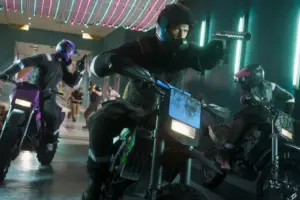
The combat system in GTA 6 is as much about positioning as it is about ballistics. Much like the iconic Road Rash series of the 90s, players can engage in melee-style combat while mounted. A simple press of the Square button while on a bike initiates a side-kick, capable of dislodging opponents or clearing a path through heavy traffic. This same button functions as a tactical entry tool when in a car; it triggers the door to swing open, creating a physical barrier or striking nearby pedestrians.
Supporting Context & Metrics: The Mechanics of Realism
The "feel" of GTA 6 is driven by its attention to minutiae. Rockstar has clearly invested significant resources into systems that, while not required for story progression, provide a tangible sense of agency.
Environmental Immersion
- The Rest Mechanic: By holding Circle against walls or L3 near ledges, players can initiate resting animations. This is not just an aesthetic choice; it is an investigative tool. By resting, players can listen to ambient NPC dialogue. Data suggests that a significant percentage of "organic" side quests—those that do not appear on the map until overheard—are triggered via this exact method.
- The First-Person Investigative Lens: While GTA 6 remains a third-person powerhouse, the tactical first-person mode (accessible via L2 + R3) is essential for uncovering environmental storytelling. Whether inspecting the cryptic, unsettling details of properties like the infamous Mandy’s house or searching for hidden stashes, this mode allows for a level of scrutiny that standard camera angles simply cannot match.
Vehicular Realism
The vehicle control suite has been expanded to a degree previously unseen in the series. Beyond basic driving, players can now manage their vehicle’s "ecosystem."
- Lighting and Utility: Using the Circle button toggles headlights, while the combination of the Left Arrow on the D-Pad and the Right Stick provides a sub-menu for hazard lights and window management.
- Emergency Vehicle Sophistication: Stealing an emergency vehicle is no longer just about speed. By holding L3 and tilting the left stick up, players can cycle through various siren tones, a feature that significantly alters how the city’s traffic AI reacts to your presence.
Official Statements and Design Philosophy
While Rockstar Games has remained notoriously tight-lipped regarding specific "Easter egg" inputs, their stated design philosophy for GTA 6 has always centered on "emergent behavior." In various development logs and pre-launch briefings, lead designers emphasized that they wanted the world of Leonida to be a "living, breathing entity."
The inclusion of features like the "flip the bird" gesture (achieved by holding L2 and pressing R1 while unarmed) serves as a testament to this philosophy. It is a social trigger. The game is programmed to recognize the gesture, and the surrounding NPCs are programmed to react—often with hostility. This is not a static game world; it is a system of inputs and consequences. As one developer noted during a technical showcase, "We aren’t just building a map; we are building a set of reactions."

Future Outlook: The Evolution of the "Sandbox"
Looking ahead, the longevity of GTA 6 will depend on the community’s ability to peel back these layers of gameplay. As players continue to experiment with these hidden controls, the meta-game—the unofficial rules and strategies developed by the player base—will continue to evolve.
We anticipate that as the game matures, these "hidden" controls will become the foundational skills for high-level play, particularly in competitive or role-playing sectors of the game. Furthermore, the integration of these mechanics into future DLC or expansions could theoretically transform GTA 6 from a standard crime drama into a sophisticated urban simulator.
Summary of Essential Controls
| Action | Input Combination |
|---|---|
| Auto-Drive | Set Waypoint + D-Pad Down + Option + Circle |
| Duck/Low Profile | Hold Circle (in vehicle) |
| Bike/Car Kick | Square (while moving) |
| Look Behind | Hold R3 |
| First-Person Inspection | L2 + R3 |
| Emergency Siren | Hold L3 + Left Stick Up |
| Flip the Bird | Hold L2 + R1 (Unarmed) |
For the average player, these controls may seem like curiosities. For the dedicated enthusiast, they are the keys to the city. As Leonida continues to reveal its secrets, one thing is certain: those who take the time to learn the language of the controls will find themselves far more powerful than those who simply follow the quest markers. The true story of GTA 6 isn’t written in the missions; it’s written in the streets, and it is entirely in your hands.