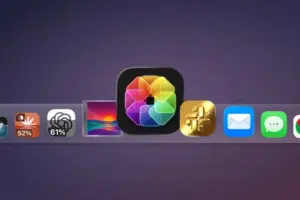
Executive Overview: A New Frontier for Interface Customization
For decades, the Apple macOS dock has been a bastion of consistency—a static, predictable row of icons that defines the user’s primary workspace. While Apple has introduced minor aesthetic refinements over the years, the fundamental nature of the application icon has remained stagnant: a silent, unchanging portal to software.
That paradigm has officially shifted with the launch of IconSwapper, a sophisticated new utility developed by Copenhagen-based designer Michael Flarup. The application allows users to transcend the limitations of the standard operating system by transforming static icons into "live" data displays. Whether you are tracking real-time AI usage for platforms like ChatGPT and Claude or simply injecting a bit of personality into your workflow, IconSwapper represents a significant leap forward in desktop personalization. By leveraging advanced Metal shaders and a proprietary rendering technique, the utility bridges the gap between static design and functional, real-time feedback, effectively turning the macOS Dock into a miniature, glanceable dashboard.
Detailed Chronology: From Static Pixels to Live Rendering
The journey to IconSwapper began long before the app’s public debut. Michael Flarup, a veteran designer with a career spanning over two decades, has maintained an obsession with the evolution of app icons since the early 2000s. His expertise is well-documented, notably in his acclaimed App Icon Book, which serves as a definitive catalog of the digital art form.
However, Flarup faced a significant engineering hurdle: macOS is famously restrictive regarding its system interface. Apple provides no official API for "theming" or modifying system-level icons, and the OS actively guards its UI components to ensure security and design consistency. Traditional methods of icon replacement were clunky, often requiring system integrity compromises or resulting in static, low-resolution replacements.

Flarup’s breakthrough involved a pivot in strategy. Instead of attempting to replace the underlying binary files—a move that would trigger macOS security protocols—he developed a technique that "draws" directly on top of the icons in real-time. By intercepting the visual output and feeding the Dock a bitmap of the desired state, Flarup successfully bypassed the system’s static limitations.
The development process involved months of refining the rendering engine to ensure that the custom icons remained consistent regardless of user interaction. Flarup spent significant time ensuring that the artwork followed the icon through every macOS-specific animation, including Dock magnification, window minimization, and the Command-Tab switcher. This persistence resulted in a seamless experience where the icon feels like a native part of the operating system rather than a third-party overlay.
Supporting Context & Metrics: The Mechanics of Modern Customization
At the heart of IconSwapper is the use of Metal shaders. Metal is Apple’s low-level, high-performance hardware-accelerated graphics API. By running icon artwork through custom Metal shaders, Flarup has enabled developers and users to manipulate visual elements in real-time.
The "Live" Utility
The most practical application of this technology is the monitoring of AI services. Users who rely heavily on tools like ChatGPT, Claude, or Cursor often struggle with usage caps and reset windows. Previously, checking these limits required opening a browser, navigating to a dashboard, and refreshing a page. With IconSwapper, the icon itself can act as a progress bar or a data ticker.

The utility supports:
- AI Usage Tracking: Visualizing remaining prompt quotas or time until a rate-limit reset.
- System Integration: Monitoring Safari page loads, download progress, or even creating interactive elements like the classic Finder "guy" whose eyes follow the cursor movement.
- Aesthetic Shaders: Applying real-time lighting effects, such as light sweeps across metallic textures when a cursor hovers over an app icon.
A Deeper Look at Technical Challenges
The technical achievement here is not merely aesthetic but functional. Flarup explains that the real challenge was ensuring the Dock recognized the custom frame as a legitimate application state. "The breakthrough was figuring out how to send the Dock a bitmap for another running app and have it draw that frame itself," Flarup noted. This architecture ensures that the system doesn’t experience performance degradation, even when multiple custom icons are running simultaneously.
Official Statements: Design Philosophy and Personalization
In an exclusive conversation regarding the philosophy behind his work, Flarup emphasized that the project is driven by a desire to humanize technology. "I’ve always felt the software we use every day could be a little more fun and a lot more personal," he remarked.
For Flarup, the "dead" nature of modern software interfaces is a missed opportunity for user engagement. By re-introducing the element of play—often missing from the hyper-minimalist aesthetics of modern macOS—he hopes to encourage a new wave of desktop customization. His approach is not just about utility; it is about reclaiming the digital space as an environment that reflects the user’s personality rather than just a corporate brand identity.

Future Outlook: Where Does Desktop Customization Go From Here?
The arrival of IconSwapper raises an intriguing question: is this the beginning of a broader movement toward "widgetized" desktop icons?
As AI agents become more deeply integrated into our daily workflows, the need for glanceable, real-time data will only grow. If a user can see how many messages are pending, how much AI bandwidth remains, or even the current track playing in Spotify without ever clicking an app, the overall efficiency of the desktop environment increases.
Market Implications
Currently, IconSwapper is priced as a one-time purchase of $19 (introductory pricing), eventually moving to $29. This model places it firmly in the category of "pro-sumer" utilities—tools designed for power users who want to optimize their workflow and aesthetic. However, the success of this tool could signal to developers that there is a hunger for more granular control over the macOS interface.
While Apple remains notoriously closed-off, the success of IconSwapper demonstrates that there are creative, non-intrusive ways to innovate within the margins. Looking ahead, we can expect to see a growing ecosystem of community-made icons, shaders, and widgets designed specifically for the platform.

Challenges and Sustainability
The primary risk for IconSwapper lies in future macOS updates. Apple frequently updates the underlying architecture of its Dock and window management systems, which could potentially break the hooks that Flarup has built. Maintaining this utility will require ongoing development to ensure that as the OS evolves, the "live" icons do not become obsolete.
However, for now, the tool provides a rare combination of technical ingenuity and whimsical design. It allows Mac users to break free from the "standardized" look of their desktops, providing a glimpse into a future where the interface is as dynamic as the applications running behind it. As we move further into the era of ubiquitous AI, the ability to monitor our digital footprint without disrupting our focus will become an essential feature, not just a design novelty.
Whether you are a power user needing to track your AI tokens or someone who simply wants the Finder icon to look back at you while you work, IconSwapper proves that even the most static elements of our digital lives can be brought to life.