Executive Overview
The landscape of mobile computing has long been defined by strict boundaries: smartphones are meant for consumption, lightweight communication, and on-the-go utility, while laptops and desktop computers remain the undisputed domains of heavy productivity, complex multitasking, and long-form content creation. However, the introduction of novel hardware form factors has begun to blur these definitive lines.
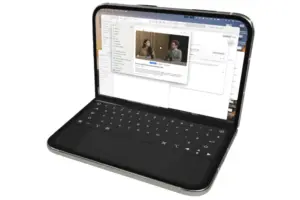
With the release of version 5.10.6, Edovia’s popular remote desktop application, Screens, has introduced a feature that bridges this gap in a remarkably clever way. Dubbed "Laptop Mode," the latest update capitalizes on the unique mechanical properties of the Apple iPhone Duo. When the device is folded halfway into a clamshell configuration, Screens transforms the hardware into a fully functional, albeit remarkably miniature, laptop setup. The upper half of the dual-screen interface displays the remote desktop environment, while the lower half converts instantly into a dedicated virtual keyboard and trackpad.
This development is far more than a simple novelty; it represents a philosophical shift in how developers are beginning to leverage unconventional hardware architectures. As folding and dual-screen mobile devices enter the mainstream consciousness, third-party software developers are tasked with rethinking UI/UX paradigms that have remained static for well over a decade. Edovia’s implementation demonstrates that remote desktop software—traditionally constrained by the limitations of standard touchscreens or external peripherals—can be adapted into self-contained, portable workstations.
Nevertheless, this breakthrough also highlights the stark design challenges facing the mobile app ecosystem. While utility apps like Screens thrive in these adaptable environments, mainstream media and social applications face steep hurdles. Industry leaders, such as Instagram head Adam Mosseri, have openly acknowledged the design complexities inherent in optimizing massive social ecosystems for folding form factors. This comprehensive report explores the mechanics of Edovia’s new update, the technical specifications of Laptop Mode, the broader implications for the mobile development community, and what this means for the future of pocket-sized productivity.
Detailed Chronology: The Evolution of Screens and the Rise of the iPhone Duo
To understand the significance of Edovia’s recent update, one must examine the trajectory of both the Screens application and the hardware ecosystem it now supports.
The Foundation of Edovia’s Screens
Edovia has spent over a decade refining its flagship remote desktop solution. Initially launched as a tool to bridge the gap between iOS devices and macOS/Windows computers, Screens has steadily evolved into a cross-platform powerhouse. Over the years, the software expanded its reach beyond standard iPhones and iPads to support alternative desktop environments, local network configurations, and cutting-edge spatial computing platforms like the Apple Vision Pro.
Despite its extensive device compatibility, Screens historically labored under a fundamental limitation inherent to mobile computing: the input bottleneck. Controlling a complex desktop operating
system on a flat glass screen usually required either an external Bluetooth keyboard and mouse or awkward on-screen overlays that obstructed the viewing area. While tablet screens offered enough real estate to manage these elements, smaller smartphones forced users to choose between seeing their desktop or interacting with it effectively.
The Arrival of the iPhone Duo
The hardware paradigm shifted dramatically with the commercialization and adoption of the iPhone Duo. Breaking away from the rigid, monolithic slab design that had dominated the smartphone industry since 2007, the iPhone Duo introduced a flexible, multi-panel structural design. This form factor allowed the device to be propped open at various angles, offering structural versatility previously exclusive to laptops or specialized foldable devices.
Early adopters and tech enthusiasts immediately recognized the potential of the hardware, but software utilization lagged behind the physical innovation. While the operating system provided foundational support for multi-window display and hinge-angle detection, developers were left to experiment with how applications could utilize a device that could transform from a flat tablet into a miniature clamshell laptop within seconds.
The Breakthrough: Screens 5.10.6
Recognizing an unprecedented opportunity, Edovia’s development team began engineering a solution tailored specifically to the clamshell configuration of the iPhone Duo. The result of these efforts culminated in version 5.10.6, released in late 2025 and early 2026.
By integrating direct hardware-level awareness of the device’s hinge angle, the application detects when a user physically folds the iPhone Duo into a partial "L" shape. Instead of forcing the user to rotate the device or rely on clumsy floating menus, the app automatically bifurcates its user interface. The top display panel assumes the role of a traditional computer monitor, mirroring the user’s remote Mac, PC, or Linux machine. Simultaneously, the bottom panel transforms into an input deck complete with a responsive software keyboard and a multi-gesture trackpad. This seamless transition marked a watershed moment for remote computing on mobile devices, proving that true pocket-sized productivity was no longer an impossible dream.
Supporting Context & Metrics: Technical Specifications and User Experience
Turning a smartphone into a functional MacBook replica sounds like a gimmick on paper, but the execution of Edovia’s Laptop Mode relies on thoughtful engineering and deep integration with mobile operating system APIs.
Inside Laptop Mode: The Split-Screen Architecture
When activated on a partially open iPhone Duo, Screens 5.10.6 dynamically allocates the device’s display real estate. The division is mathematically optimized to mimic the proportions of a subcompact laptop, such as a 12-inch MacBook, albeit scaled down to smartphone dimensions.
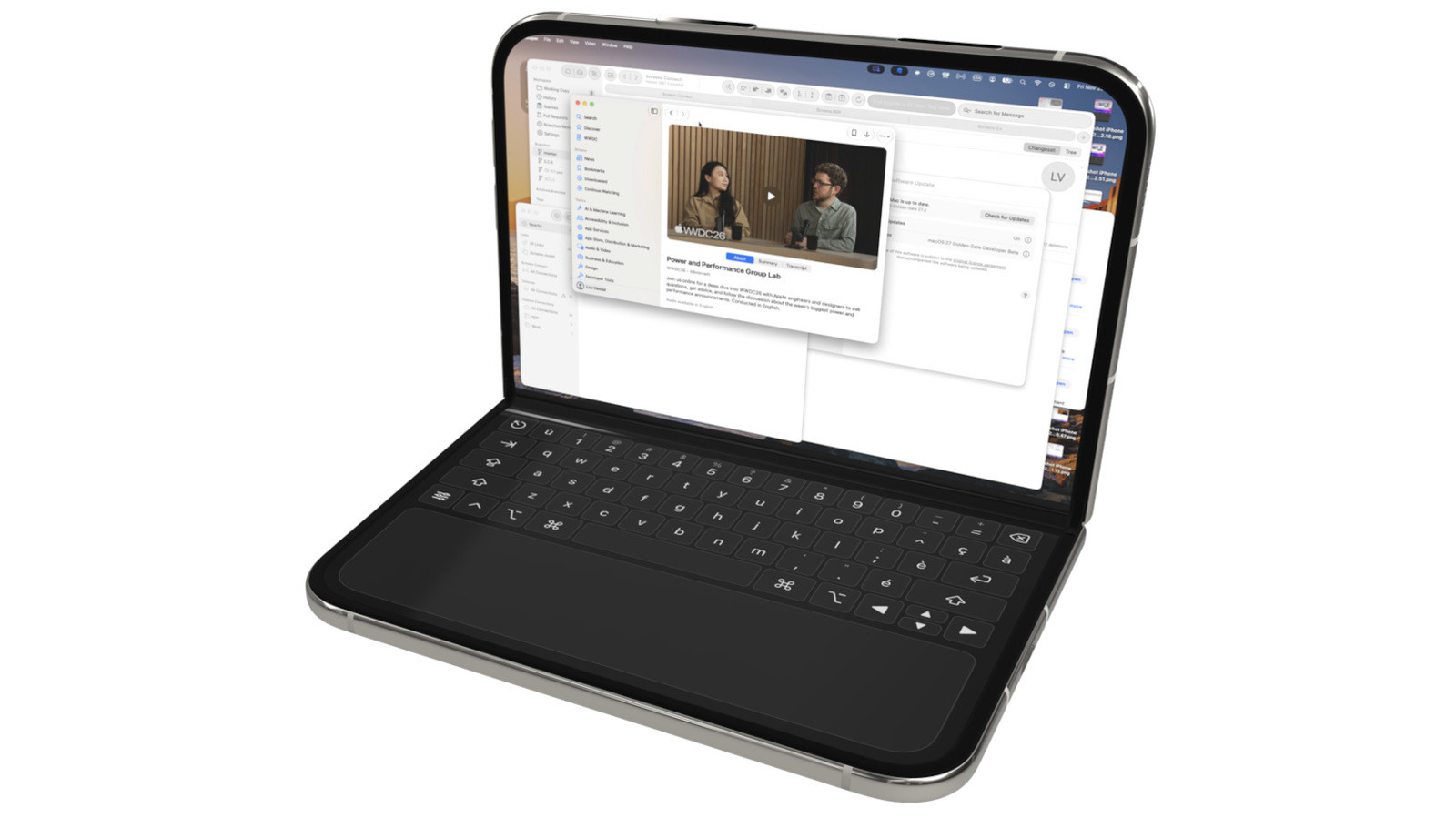
- The Upper Display (The Monitor): This section renders the remote desktop feed at a high scaling resolution, ensuring that UI elements from macOS or Windows remain legible despite the reduced physical size. Users can pan and zoom within this window, though the primary intent is to view a full desktop workspace at a glance.
- The Lower Display (The Input Deck): The bottom half of the screen transforms into an interactive control center. It features a fully customizable software keyboard and an integrated trackpad zone that handles mouse movement, clicking, and scrolling.
Advanced Input Mechanics
Typing on a miniature touchscreen can often be a frustrating, error-prone experience. To mitigate this, Edovia integrated several advanced input features into the Screens virtual keyboard:
- Multi-Language Support: The keyboard adapts to regional layouts instantly, matching the user’s system preferences or remote desktop configurations.
- iPad-Style Flick Gestures: Borrowing a page from Apple’s iPadOS software keyboard, users can swipe down on individual keys to quickly input numbers and secondary symbols without needing to toggle to a separate punctuation menu. This significantly accelerates typing speed during quick terminal commands or short email drafts.
- Screens Gesture Integration: The virtual trackpad supports the application’s proprietary multi-touch gestures, allowing users to execute complex desktop shortcuts—such as Exposé, Mission Control, or page-swiping—directly from the smartphone’s lower display panel.
Usability: A Tool for the "In-a-Pinch" Scenario
Edovia is transparent about the limitations of the setup. No virtual keyboard and trackpad can fully replace the tactile feedback, key travel, and muscle memory associated with a physical, full-sized mechanical or laptop keyboard. However, the metric of success for Laptop Mode is not replacing a developer’s primary workstation; rather, it is about eliminating friction during emergency access scenarios.
Whether a system administrator needs to execute a quick terminal command while away from their desk, a writer needs to fix a typo in a cloud-hosted document, or a professional needs to reboot a frozen desktop application, the iPhone Duo running Screens 5.10.6 provides a self-contained workstation that fits comfortably inside a jacket pocket.
Official Statements and Industry Reactions
The release of Screens 5.10.6 has sparked wider conversations across the tech industry regarding the challenges and opportunities of designing software for unconventional hardware form factors.
Edovia’s Vision for Remote Computing
In the official release notes and company blog posts detailing version 5.10.6, Edovia emphasized its commitment to pushing the boundaries of what remote desktop software can achieve. The company noted that the unique geometry of the iPhone Duo presented a rare design puzzle: how to make a productivity app feel native to a device that defies traditional categorization.
"The iPhone Duo is not just a bigger phone; it is a fundamentally different canvas," an Edovia spokesperson noted in technical communications. "By utilizing Laptop Mode, we wanted to give our users a way to interact with their remote machines that feels organic, utilizing the physical hinge of the device in a way that desktop and laptop users will instantly recognize and appreciate."
The Counter-Perspective: Mainstream Design Challenges
While utility-focused developers like Edovia are finding creative ways to embrace folding hardware, the broader software development community is sounding notes of caution. Designing for devices with variable display configurations, folding screens, and split-screen multitasking introduces an exponential increase in QA (Quality Assurance) testing scenarios and UI state management.
This sentiment was recently echoed by Instagram head Adam Mosseri. In public remarks addressing the technical hurdles of adapting major social media platforms for the iPhone Duo, Mosseri described the process as "pretty challenging."
Unlike utility applications—where split-screen layouts naturally map to functional divisions like "display" and "input"—media-rich social apps rely heavily on continuous scrolling, immersive full-screen media consumption, and dynamic ad placement. Forcing an app like Instagram to gracefully bridge a physical hinge or adapt dynamically between a flat tablet view and a folded laptop-style view requires extensive UI redesigns. Mosseri’s comments underscore a vital truth in modern software engineering: hardware innovation often outpaces software readiness, leaving developers scrambling to catch up with new physical form factors.
Future Outlook: The Road Ahead for Pocket-Sized Productivity
As we look toward the future of mobile and desktop computing integration, the success of applications like Edovia’s Screens on folding and dual-screen hardware offers a compelling glimpse into what is possible.
The Convergence of Mobile and Desktop
The historical division between pocket-sized communication devices and heavy-duty workstations is continuing to erode. With processing power in modern smartphones rivaling and sometimes exceeding that of older desktop computers, the bottleneck has never been raw compute capability—it has always been user interface design and input peripherals.
Innovations like Laptop Mode prove that software can intelligently adapt to physical hardware configurations. As display technology improves, haptic feedback on touchscreens becomes more sophisticated, and AI-assisted predictive text minimizes typing errors, the viability of doing serious work on a device that folds up and slides into your pocket will only increase.
What to Expect Next
In the coming months and years, industry analysts expect to see:
- Expanded Developer Adoption: As more consumers adopt folding devices like the iPhone Duo, software frameworks will mature, making it easier for mainstream developers to implement split-screen and hinge-aware UI states.
- Advanced Haptic Integration: Future software updates from productivity developers will likely leverage advanced haptic engines to simulate the tactile click of physical keys on glass surfaces, further bridging the gap between virtual and physical input devices.
- Mainstream Software Adaptation: While platforms like Instagram find the transition challenging, economic pressures and user demand will ultimately force major ecosystem players to optimize their apps for folding displays, transforming novelty features into industry standards.
Ultimately, Edovia’s Screens has done more than just update an app; it has provided a masterclass in creative problem-solving. By turning an iPhone Duo into an "itty-bitty MacBook," the developers have shown that the future of computing isn’t about carrying heavier machines—it’s about making the devices we already carry do extraordinary things.