As the official release date of December 8 approaches, the WordPress ecosystem is bracing for a monumental shift. WordPress 7.2, currently moving through its final release candidate stages following the deployment of Beta 5, introduces a slate of architectural updates, user-interface overhauls, and deep-seated core integrations.
However, this cycle has been far from routine. Sparking fierce debates across developer blogs, core Trac tickets, and community forums, version 7.2 forces site owners, SEO professionals, and developers to make critical pre-update decisions—most notably regarding an opt-out public redirection feature that goes live by default.
This comprehensive report provides an exhaustive look at everything you need to know about WordPress 7.2, covering the mechanics and controversies of the new /random/ path, the eleventh-hour removal of the Secrets API, new read-only AI abilities in core, visual admin modifications, and technical considerations for production environments.
Executive Overview
WordPress 7.2 represents a transitional milestone for the world’s most popular Content Management System (CMS). While the version introduces performance optimizations, native SVG admin icons, and foundational read-only capabilities designed to bridge the gap between core platforms and autonomous AI agents, its development cycle has been defined by high-stakes controversy.
The headlining features and changes shaping this release include:
- The
/random/Endpoint: A native routing feature that sends users requesting/random/to a randomly selected, published, non-password-protected post. Critically, this feature is enabled by default, forcing site owners to write code if they wish to disable it. - The Pulled Secrets API: Designed to allow plugins to securely store credentials via libsodium encryption, this high-profile addition was abruptly pulled from core on November 17 following intense pushback from core contributors over its write-capability security implications.
- Core AI Building Blocks: Three new read-only abilities allowing external applications to query content, users, and settings through the WordPress REST API, Model Context Protocol (MCP), or native AI clients.
- Admin Asset Splitting & UI Overhauls: The deprecation of
load-scripts.phpandload-styles.phpin favor of individual asset loading, coupled with a complete visual transition from Dashicons to native SVG icons in the admin bar and menus.
Detailed Chronology: How the /random/ Redirect Landed On by Default
The path toward the controversial /random/ feature has been turbulent, marked by rapid iterations, policy debates, and eleventh-hour code optimizations.
From Optional Query to Default Rewrite Rule
Random redirects first appeared in the WordPress code repository on September 21 as an optional ?random query string that required sites to explicitly return true via a developer filter (enable_random_content_redirect). Just two days later, on September 23, the code was abruptly reverted, with the commit message noting that the feature was slated for WordPress 7.2 but required substantial refinement.
By October 16, the feature re-emerged in a vastly different form: it was transformed from a query string into a full /random/ rewrite rule, and the default value of the underlying filter was flipped from false to true. It was officially integrated into Beta 1 on October 20.
Community Backlash and Core Responses
The decision to enable automatic random routing by default sparked a firestorm of objections in Aaron Jorbin’s developer notes. Noted WordPress developer Joost de Valk slammed the decision, writing: "This is a horrible idea to turn on by default," and adding, "Now I fear people will randomly end up on invoices, offers, client-specific pages, etc."
Defending the opt-out mechanism, Jorbin pointed to long-standing WordPress philosophy, stating: "The WordPress Philosophies mean that opt-out options are not added for every feature, otherwise the options pages would become unusable."

Project lead Matt Mullenweg weighed in on the implementation, expressing agreement with critics regarding URL structure: "I agree it should not use page URL structure," and adding, "I don’t think this should be an appended pretty URL; the request was just for /?random, just at root." Despite these discussions, the core architecture remained fundamentally intact, deploying as a pretty permalink structure with translatable bases.
Technical Breakdown: Mechanics of the /random/ Routing System
To successfully navigate the WordPress 7.2 upgrade, site administrators and developers must understand how the /random/ path operates under the hood.
Scope, Eligibility, and Permalinks
By default, the /random/ path (along with variations across categories, tags, author archives, and eligible custom post types) applies standard rules:
- Eligible Content: Standard published posts without passwords. Pages and attachments are excluded by default.
- Custom Post Types: Publicly queryable custom post types with active archives are included unless developers explicitly register them with
'randomable' => false. - Slug Conflicts: If a site owner creates a published page or post with the exact slug "random" using post-name permalinks, that physical page will successfully override and intercept the random redirect. Core contributor Peter Wilson confirmed this behavior, recommending that sites prone to slug collisions use an alternative base like
shuffle.
Security, Headers, and Performance Optimization
The system issues a 302 Temporary Redirect. Crucially, the response sends no-cache headers alongside an X-Robots-Tag: noindex, follow header targeting the original /random/ request—though this header does not automatically cascade to the final destination post.
Performance concerns regarding large-scale database queries on massive archives were addressed late in the cycle. On November 17, a performance patch landed (changeset 65542) that avoids sorting entire archives randomly. Instead, it queries random post IDs directly, keeping resource consumption decoupled from total post volume. For sparse archives, it falls back to a cached pool of up to 1,000 randomly ordered posts, leveraging persistent object caching where available.
How to Disable the /random/ Feature
Because WordPress 7.2 provides no graphical toggle within the WordPress dashboard to deactivate random redirects, site administrators must rely on code.
To disable the feature completely, administrators can deploy a one-line Must-Use (MU) plugin containing the following filter:
add_filter( 'wp_enable_random_content_redirect', '__return_false' );Note: Be aware that a developer blog roundup incorrectly referenced wp_enable_random_content_direct (missing an ‘r’), which has zero effect on the code. Utilizing the correct filter will hide the permalink base field and disable all associated rewrite rules. Site operators must flush rewrite rules after applying this change.
The Secrets API: Pulled from 7.2 Over Security Architecture Concerns
One of the most dramatic developments in the WordPress 7.2 cycle was the eleventh-hour removal of the proposed Secrets API.
The Architecture and the Controversy
Announced on November 11, the Secrets API was engineered to give plugins a standardized, secure mechanism to store sensitive credentials—such as API tokens and private keys—using libsodium encryption. It utilized the core options table, allowing hosting environments to swap out storage mechanisms via a secrets.php drop-in.
However, the architecture drew sharp criticism from prominent core contributors. Ryan McCue voiced strong opposition, arguing that any API allowing WordPress to write secrets—rather than merely reading them from an external, highly secure host environment—offered no genuine security advantage over an already encrypted database. McCue wrote: "I am a strong -1 on this feature, and I think this should be backed out of core for 7.2 until the above is resolved."
Matt Mullenweg immediately concurred, noting: "It’s also not a great time to be making ourselves a target for very sensitive things like that."
Reversal and Impact on Ecosystem Plugins
Following the discovery by Peter Wilson that the API failed to rigorously check manage_secrets capabilities upon writing, core maintainers reverted the API on November 17 (changeset 65538).
The removal directly impacts the official AI plugin (version 1.5.0), which had recently migrated its Key Encryption experiment into a bundled version of the Secrets API. Maintainers are now faced with refactoring the plugin to handle encryption securely outside of core until the API matures for a potential re-introduction in WordPress 7.3.
Core AI Building Blocks & The Agentic Web
Building upon the native AI client and Connectors screen introduced in WordPress 7.0, version 7.2 introduces three new read-only abilities designed for programmatic access:
- Content Querying: Allowing authorized applications to query site content.
- User Data Queries: Accessing user metadata safely.
- Settings Queries: Inspecting site configurations.
Security and Exposure Flags
These abilities are marked with exposure flags, explicitly defining whether they can be called via the WordPress REST API, the Model Context Protocol (MCP), or external AI agents. Crucially, as documented in core, exposure flags do not bypass execution permissions. The content query ability enforces strict authentication, requiring a logged-in user with appropriate read permissions.
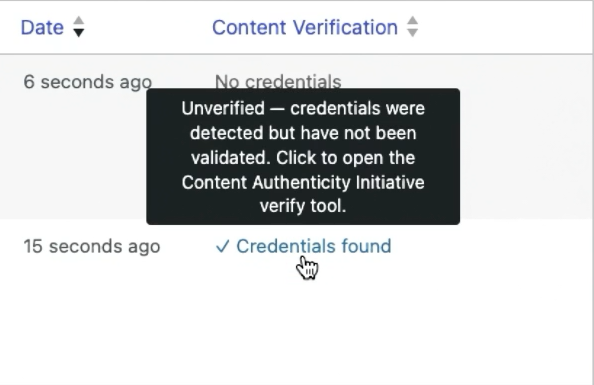
The official AI plugin continues to serve as the testing ground for live editor-facing features, including text-to-speech, revision summaries, and Content Verification tools designed to flag C2PA digital provenance credentials—even though cryptographic validation is slated for future iterations.
Administrative Overhauls: Asset Splitting and SVG Dashicons
Beyond backend APIs and routing mechanics, WordPress 7.2 delivers substantial quality-of-life enhancements for backend administrators and plugin authors:
- Granular Asset Loading: Admin and login screens now split combined JavaScript and stylesheets into individual, modular assets. Prefetching mechanisms predict the next screen a user will view, loading assets asynchronously. Long-standing aggregation scripts (
load-scripts.phpandload-styles.php) have been officially deprecated. - SVG Admin Icons: Dashicons have been superseded across the admin bar and menus by modern, crisp SVG icons. Developers maintaining custom plugins that hook into icon CSS via
::beforepseudo-elements must audit their stylesheets to ensure visual compatibility. - Application Password Alerts: Beta 5 introduced automated notification emails whenever an application password is successfully generated on a user account.
- PHP 8.6 Readiness: Version 7.2 brings full compatibility and optimization support for PHP 8.6.
Future Outlook & Actionable Recommendations
As Release Candidate 1 paves the way toward the final stable release on December 8, site owners, agencies, and developers must take proactive steps:
- Audit Custom Post Types: Review all registered custom post types to identify which ones are publicly queryable and feature active archives. For content types that should never be surfaced via random navigation (e.g., client portals, testimonials, or restricted resources), ensure
'randomable' => falseis declared. - Deploy Testing Environments: Spin up a staging site running RC1 to test how
/random/interacts with your specific caching layers, CDNs, and SEO plugins. Be prepared to immediately flush your page cache post-upgrade to prevent stale 404 errors. - Prepare Administrative Overrides: If your organization prefers to keep internal content strictly structured and gated against random public discovery, prepare an MU-plugin containing the
wp_enable_random_content_redirectfilter to disable the routing behavior upon update day. - Inspect Plugin Admin Styles: Audit custom plugins for legacy Dashicon CSS hooks to prevent UI breakage following the global transition to native SVG admin icons.