Executive Overview
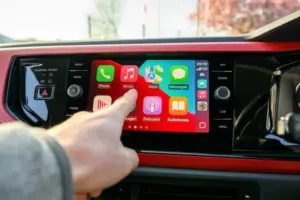
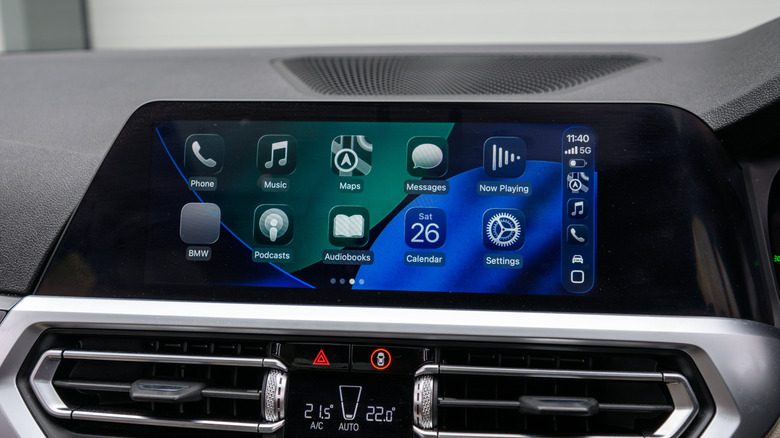
For millions of drivers worldwide, Apple CarPlay has revolutionized the in-car entertainment and navigation experience, seamlessly mirroring the familiar interface of an iPhone onto the vehicle’s dashboard. However, a significant technological divide persists across the automotive landscape: while newer, luxury vehicles increasingly feature out-of-the-box wireless CarPlay, an overwhelming majority of compatible cars still tether drivers to the dashboard via a physical Lightning or USB-C cable.
While wired connections boast undeniable stability and continuous device charging, they sacrifice modern convenience. Drivers are forced to manually plug in their smartphones every time they enter the vehicle—a frustrating ritual for short trips or daily errands. Furthermore, the traditional tether restricts where you can safely place your iPhone, cluttering the center console and exposing cables to wear and tear.
Fortunately, bridging the gap between wired convenience and wireless freedom does not require a costly, invasive aftermarket head unit replacement or a brand-new vehicle purchase. A burgeoning market of plug-and-play wireless CarPlay adapters has emerged, promising to transform existing wired systems into wireless powerhouses in mere seconds. Ranging typically between $30 and $50 from reputable brands like Ottocast and Amzfeel, these compact dongles act as digital intermediaries, establishing a dual Bluetooth and Wi-Fi bridge between your iPhone and your car’s infotainment system.
Yet, not all adapters are created equal. Navigating this accessory market requires careful consideration. Poorly optimized hardware can introduce frustrating audio latency, sluggish connection times, or complete incompatibility with recent iOS updates. This comprehensive guide explores everything you need to know before purchasing a wireless CarPlay adapter, detailing compatibility prerequisites, crucial performance metrics, hardware considerations, and how to select a device that guarantees a seamless, premium in-car experience.
Detailed Chronology: The Evolution from Tethered Dashboards to Wireless Freedom
To understand why wireless CarPlay adapters have become one of the most sought-after automotive accessories of the decade, it is necessary to examine how in-car smartphone integration has evolved over the past ten years.
The Wired Era (2014–2018)
When Apple officially unveiled CarPlay at the Geneva Motor Show in March 2014, the technology was heavily reliant on physical connectivity. Early automotive infotainment processors lacked the robust Wi-Fi bandwidth and low-latency processing power required to transmit high-resolution screen mirroring, audio streaming, and location data fluidly over the air. Consequently, automotive manufacturers integrated CarPlay strictly through USB ports. While revolutionary for its time, this tethered approach meant drivers were physically locked into the Apple ecosystem via cable, creating clutter and rendering quick phone checks nearly impossible without unplugging the device.
The Introduction of Wireless CarPlay (2018–2020)
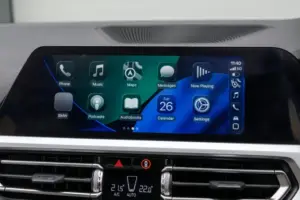
As automotive computing hardware matured, Apple introduced wireless CarPlay in 2018, debuted primarily by high-end luxury automakers like BMW. This iteration relied on a sophisticated handshake protocol: Bluetooth was utilized for the initial device discovery and pairing process, after which the system swiftly transitioned heavy data tasks to a dedicated, high-speed Wi-Fi network channel. This allowed audio, navigation, and app interfaces to stream smoothly without a physical wire. However, automakers largely treated wireless CarPlay as a premium, high-tier feature, locking it behind expensive technology packages and leaving millions of owners of standard or slightly older vehicles behind.
The Rise of the Aftermarket Adapter (2020–Present)
Recognizing a massive commercial void, third-party technology manufacturers began engineering compact hardware dongles designed to emulate factory-installed wireless receivers. Early generations of these adapters (circa 2020–2021) were plagued by teething issues: inconsistent auto-reconnection loops, severe audio lag during phone calls, and overheating issues during extended summer road trips.

However, rapid advancements in dual-band Wi-Fi chips (incorporating 5GHz frequencies) and modernized Bluetooth 5.0+ modules transformed these gadgets. Modern adapters are now sophisticated micro-computers running custom embedded Linux or Android-based kernels, capable of initializing a connection within 5 to 10 seconds of starting the vehicle engine. What was once an unstable novelty has matured into a reliable, mainstream automotive upgrade.
Supporting Context & Metrics: Decoding the Hardware and Compatibility Requirements
Before investing in a wireless CarPlay adapter, drivers must perform due diligence regarding their vehicle’s electronic architecture and the smartphone’s software environment. A mismatch in hardware standards can render even the most expensive adapter entirely useless.
1. The Hard Prerequisite: Built-in Wired CarPlay
The single most common misconception among consumers is that a wireless adapter can add CarPlay functionality to a car that never had it. This is physically impossible. Wireless adapters are strictly converters. They intercept the data stream that your car’s infotainment system normally expects to receive from a plugged-in iPhone and reroute it wirelessly.
- The Rule: If your car does not currently support wired CarPlay out of the box, a wireless adapter will not work. In such scenarios, consumers must explore standalone portable CarPlay display screens that mount to the dashboard or windshield.
2. Physical Ports and Dashboard Integration
Automotive interior design is undergoing a rapid transition period regarding power and data delivery ports.
- USB-A vs. USB-C: Older vehicles predominantly feature standard rectangular USB-A ports, while modern models have largely migrated to reversible USB-C ports.
- The Fix: When purchasing an adapter, verify whether it matches your vehicle’s factory data port. While you can technically use a physical adapter (e.g., plugging a USB-A adapter into a USB-C port via a converter), doing so introduces extra connection points that can fail, look cluttered, or degrade data transfer integrity. Always purchase an adapter native to your port layout.
3. iOS Software Updates and Firmware Longevity
Apple updates its mobile operating system annually, bringing sweeping security patches, interface overhauls, and protocol tweaks.
- The Risk: Budget-tier adapters lacking over-the-air (OTA) firmware update capabilities frequently break when a new major version of iOS is released. A sudden protocol shift by Apple can instantly brick a non-updatable adapter.
- The Solution: Prioritize manufacturers who explicitly support OTA firmware updates via a web browser interface or a dedicated smartphone companion app, ensuring your hardware remains resilient against future software cycles.
4. Critical Performance Metrics: Bluetooth and Wi-Fi Standards
The performance of a wireless CarPlay adapter boils down to how efficiently it manages radio frequencies inside a crowded cabin.
| Specification | Subpar Standard | Premium Standard | Real-World Impact |
|---|---|---|---|
| Wi-Fi Band | 2.4 GHz | 5 GHz (Dual-Band) | 2.4GHz is prone to heavy interference from local networks and devices; 5GHz offers clean, lightning-fast bandwidth for fluid map rendering and zero-lag audio. |
| Bluetooth Version | Bluetooth 4.0 or older | Bluetooth 5.0 or newer | Ensures ultra-fast initial device discovery, stable pairing, and minimal power consumption on your iPhone. |
| Auto-Reconnect | Manual Pairing Required | Instant Auto-Boot | High-end units connect automatically within seconds of ignition; inferior units force you into your iPhone’s Bluetooth menu every trip. |
| Multi-Device Support | Single User | Multi-User Profiles | Crucial for households sharing a single vehicle, allowing seamless switching between different paired iPhones. |
Official Industry Perspectives and Expert Insights
To gain a deeper understanding of the technological hurdles surrounding wireless connectivity, automotive electronics engineers and consumer technology analysts emphasize several key engineering challenges.
Industry specialists point out that the primary hurdle in wireless screen mirroring is the delicate balance between bandwidth allocation and thermal management. Unlike standard Bluetooth audio streaming—which transmits compressed, low-bandwidth data—CarPlay requires real-time video stream encoding, multi-channel audio transmission, GPS data polling, and continuous microphone input for Siri voice commands simultaneously.
"When designing a wireless bridge for automotive infotainment, you are essentially asking a matchbox-sized computer to process heavy data streams in a confined, unventilated center console that can easily exceed 120°F (49°C) under direct summer sunlight," notes a senior firmware engineer specializing in in-vehicle infotainment accessories. "Thermal throttling is the silent killer of cheap adapters. If a manufacturer cuts corners on heatsinking or utilizes outdated Wi-Fi chips, the unit will inevitably lag, drop connections, or crash mid-navigation."
Furthermore, cybersecurity analysts emphasize the importance of data privacy when utilizing third-party dongles. Because these adapters sit directly between your smartphone and your vehicle’s CAN bus (via the head unit), consumers are strongly advised to purchase hardware from established, verifiable brands (such as Ottocast, CarlinKit, or Amzfeel) rather than unbranded white-label knockoffs from disreputable marketplaces, which may lack secure firmware encryption.
Future Outlook: The Horizon of In-Car Connectivity
As the automotive and consumer electronics sectors continue to converge, the trajectory of in-car connectivity points toward even deeper, more integrated ecosystems.
1. The Proliferation of Native Wireless Systems
While aftermarket adapters are currently experiencing a massive boom, automakers are slowly standardizing wireless CarPlay across broader trim levels, gradually reducing the long-term addressable market for external dongles. However, given the average lifespan of a modern passenger vehicle—which frequently exceeds 12 years on American roadways—millions of legacy wired-CarPlay vehicles will remain active for decades, ensuring sustained demand for conversion adapters well into the 2030s.
2. The Next Generation of Multi-Protocol Adapters
The cutting edge of adapter technology is no longer limited to simple CarPlay conversion. High-end aftermarket units are beginning to incorporate multi-platform support, enabling seamless switching between Apple CarPlay and Android Auto within the same hardware footprint. Furthermore, luxury-tier adapters are introducing advanced multimedia streaming capabilities—allowing passengers to stream content from platforms like YouTube and Netflix directly to the dashboard display while parked (though strictly disabled while the vehicle is in motion for safety compliance).
3. Ultra-Wideband (UWB) and Spatial Integration
Looking further ahead, industry watchers anticipate the integration of Ultra-Wideband (UWB) technology into automotive accessory ecosystems. Moving beyond traditional Bluetooth proximity sensing, UWB allows for centimeter-accurate spatial awareness. In future automotive environments, a UWB-equipped adapter will not only connect your iPhone the moment you approach the vehicle door, but it could also customize seat positions, climate control profiles, and dashboard layouts based on who is sitting in the driver’s seat, elevating personalized in-car technology to unprecedented heights.
Summary Checklist for Buyers
If you are ready to cut the cord and upgrade your driving experience, keep this quick-reference checklist in mind before pulling the trigger on a purchase:
- Verify Existing CarPlay: Ensure your car already features factory wired CarPlay via USB.
- Check Port Geometry: Match the adapter’s plug (USB-A or USB-C) directly to your car’s data port.
- Insist on 5GHz Wi-Fi: Avoid sluggish 2.4GHz-only models to prevent audio lag and map stutter.
- Demand OTA Updates: Buy from brands that provide active firmware support to safeguard against future iOS updates.
- Evaluate Extra Features: Look for auto-reconnection, multi-device pairing, and steering wheel control compatibility if you share your car with family members.
By investing in a well-reviewed, thoughtfully engineered adapter, you can permanently eliminate dashboard cable clutter and enjoy the seamless, futuristic convenience of wireless Apple CarPlay today.