Executive Overview
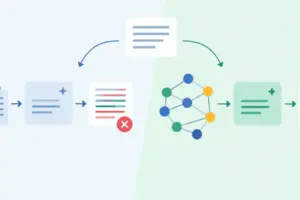
The landscape of Retrieval-Augmented Generation (RAG) is undergoing a profound paradigm shift. For years, standard RAG architectures have relied on a text-centric foundation: documents are ingested, stripped of non-textual elements, sliced into rigid character chunks, embedded into vector spaces, and queried via text-to-text similarity metrics. While this approach excels at processing straightforward prose, corporate whitepapers, technical documentation, and academic literature, it fails catastrophically when confronted with modern business documents.
Today’s enterprise documents are inherently multi-modal. They are rich tapestries of prose, embedded charts, scanned architectural diagrams, complex data tables, and high-resolution infographics. When a traditional text-based parsing pipeline encounters a PDF packed with structural tables and visual analytics, it destroys formatting, flattens hierarchies, and completely ignores embedded imagery. The resulting system attempts to answer complex operational questions from an incomplete, text-only fragment of the original source material.
Enter the Multi-Modal RAG pipeline—an advanced architecture that elevates images, diagrams, and tables to first-class retrievable objects alongside traditional text. By bridging the gap between computer vision and natural language processing, modern AI systems can natively reason across multiple modalities.
In this comprehensive technical guide, we will explore the architectural blueprint, engineering prerequisites, and step-by-step implementation of a production-grade Multi-Modal RAG pipeline built in Python. Utilizing the power of LangChain, the unstructured document parsing library, ChromaDB, and OpenAI’s GPT-4o API, this guide provides a scalable framework designed for standard hardware and demanding enterprise workloads.
Detailed Chronology & Architecture Breakdown
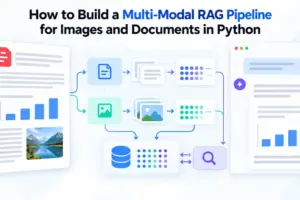
To successfully construct a multi-modal retrieval system, developers must move away from the linear, one-size-fits-all ingestion patterns of early RAG systems. Instead, processing unstructured documents requires a sophisticated, four-stage architectural lifecycle: Parse, Summarize, Store, and Retrieve.
+------------------+     +-------------------+     +---------------------+
|  Complex PDF     | --> | 1. Parse & Split  | --> | 2. GPT-4o Summarize |
|  (Text & Images) |     | (Unstructured)    |     | (Searchable Proxies)|
+------------------+     +-------------------+     +---------------------+
                                                              |
                                                              v
+------------------+     +-------------------+     +---------------------+
|  Multimodal      | <-- | 4. Query Pipeline | <-- | 3. Multi-Vector     |
|  GPT-4o Response |     | (Hybrid Context)  |     | Store (Chroma/Doc)  |
+------------------+     +-------------------+     +---------------------+
Stage 1: Document Parsing and Element Isolation
The first bottleneck in multi-modal document processing is extraction. Traditional PDF text-scrappers read binary character streams in arbitrary order, scrambling multi-column layouts and omitting images entirely.
To solve this, our pipeline leverages the unstructured library. Unlike basic parsers, partition_pdf() uses advanced layout analysis models to classify document components. It distinguishes paragraphs, headers, tables, and embedded images, outputting a structured stream of typed elements.
Stage 2: Generative Image Summarization
Vector databases are fundamentally text-indexed similarity search engines; they cannot natively compute vector distances on raw PNG or JPEG files. Consequently, every extracted image must be assigned a searchable text proxy—a dense, natural-language description that captures its visual content, layout, and data points.
By passing extracted images to OpenAI’s GPT-4o with a specialized retrieval prompt, the system generates comprehensive descriptive summaries. These summaries are embedded into the vector database, acting as semantic bridges between text-based user queries and non-textual visual assets.
Stage 3: Multi-Vector Storage Architecture
Standard RAG pipelines link an embedded chunk directly to its source text. Multi-modal RAG requires a decoupled storage mechanism known as a Multi-Vector Retriever.
This pattern maintains two distinct data stores:
- The Vector Store (Chroma): Stores the dense embeddings of both the textual document chunks and the AI-generated image summaries. This store handles the initial similarity search.
- The Document Store (
InMemoryStore): Holds the raw, unadulterated source content—the original text strings and the file paths to the physical image assets.
Both stores are synchronized using unique UUIDs, ensuring that when an image summary matches a query vector, the pipeline can instantly retrieve and deliver the high-resolution source image to the generation model.
Stage 4: Multimodal Query and Generative Reasoning
At query time, the user submits a natural language question. The retriever scans the vector database, identifies the closest matching summaries (whether derived from text or images), fetches the corresponding raw documents from the document store, and packages them into a unified multimodal payload for GPT-4o. The model then reasons across all retrieved evidence simultaneously, formulating a grounded, comprehensive answer.
Prerequisites and Environment Setup
Before diving into the code, ensure your development environment is properly provisioned. Because the unstructured library relies on lower-level system tools to handle PDF rendering and image extraction, you must install both Python packages and system-level dependencies.
System Dependencies (Debian/Ubuntu)
apt-get update && apt-get install -y poppler-utils tesseract-ocr(Note: poppler-utils is mandatory for rendering PDF pages into images during parsing, while tesseract-ocr provides fallback optical character recognition for scanned documents).
Python Package Installation
Install the necessary orchestration, vector database, and client libraries via pip:
pip install langchain langchain-openai unstructured[pdf] chromadb pillowEnvironment Configuration
Authenticate your session by exporting your OpenAI API key securely within your environment:
import os

# Securely set your OpenAI API key
os.environ["OPENAI_API_KEY"] = "your-api-key-here"
Step-by-Step Implementation Guide
Step 1: Parsing the Document into Text and Image Elements
We begin by ingesting a complex target document (report.pdf) using partition_pdf(). We configure parameters to actively extract image blocks, infer complex table structures, and chunk text dynamically by document headers.
from unstructured.partition.pdf import partition_pdf

# Execute the partition process on a complex multi-modal PDF
raw_elements = partition_pdf(
    filename="report.pdf",
    extract_image_block_types=["Image"],
    extract_image_block_output_dir="./extracted_images",
    infer_table_structure=True,
    chunking_strategy="by_title",
    max_characters=4000,
)

# Separate the raw output stream into distinct text and image collections
text_elements = []
image_paths = []

for el in raw_elements:
  if "CompositeElement" in str(type(el)):
    text_elements.append(str(el))
  elif "Image" in str(type(el)):
    image_paths.append(el.metadata.image_path)

print(
    f"Successfully extracted len(text_elements) text chunks and"
    f" len(image_paths) embedded images."
)
Step 2: Generating Searchable Summaries for Each Image
Because raw images cannot be indexed directly by standard vector stores, we initialize an OpenAI client to process each extracted image file through GPT-4o, generating rich textual descriptions optimized for semantic retrieval.
import base64
from openai import OpenAI

client = OpenAI()

def summarize_image(image_path: str) -> str:
  """Encodes an image to base64 and requests a detailed retrieval-optimized summary from GPT-4o."""
  with open(image_path, "rb") as f:
    image_data = base64.b64encode(f.read()).decode("utf-8")

  response = client.chat.completions.create(
      model="gpt-4o",
      messages=[
          "role":
              "user",
          "content": [

                  "type": "image_url",
                  "image_url":
                      "url": f"data:image/png;base64,image_data"
                  ,
              ,

                  "type": "text",
                  "text": (
                      "Describe this image in meticulous detail, capturing all"
                      " data points, chart trends, table values, and visual"
                      " text for use in an enterprise search system."
                  ),
              ,
          ],
      ],
      max_tokens=500,
  )
  return response.choices[0].message.content

# Generate searchable text proxies for all extracted images
print("Generating AI summaries for extracted visual assets...")
image_summaries = [summarize_image(p) for p in image_paths]
print(f"Generated len(image_summaries) image summaries.")
Step 3: Building the Multi-Vector Store
With text chunks and image summaries ready, we construct the multi-vector retrieval system using LangChain, Chroma, and an in-memory document store. This setup ensures that semantic searches query the lightweight text summaries, while retrieval pulls the high-resolution raw assets.
import uuid
from langchain.retrievers.multi_vector import MultiVectorRetriever
from langchain.storage import InMemoryStore
from langchain_chroma import Chroma
from langchain_core.documents import Document
from langchain_openai import OpenAIEmbeddings

# Initialize embedding model and vector database backend
embeddings = OpenAIEmbeddings(model="text-embedding-3-small")
vectorstore = Chroma(
    collection_name="multimodal_rag", embedding_function=embeddings
)

# Initialize document store for raw payloads
docstore = InMemoryStore()

# Instantiate the Multi-Vector Retriever
retriever = MultiVectorRetriever(
    vectorstore=vectorstore, docstore=docstore, id_key="doc_id"
)

# Generate unique identifiers for all elements
text_ids = [str(uuid.uuid4()) for _ in text_elements]
image_ids = [str(uuid.uuid4()) for _ in image_summaries]

# 1. Add searchable summaries/text to the vector store
vectorstore.add_documents([
    Document(page_content=t, metadata="doc_id": i)
    for t, i in zip(text_elements + image_summaries, text_ids + image_ids)
])

# 2. Add raw, uncompressed source documents/assets to the document store
raw_docs = [
    Document(page_content=t, metadata="type": "text") for t in text_elements
] + [
    Document(page_content=p, metadata="type": "image") for p in image_paths
]

retriever.docstore.mset(list(zip(text_ids + image_ids, raw_docs)))
print("Multi-vector store successfully indexed and synchronized.")
Step 4: Querying the Pipeline with Multimodal Retrieval
The final architectural phase involves querying the pipeline. When a user asks a complex question, the retriever fetches relevant text chunks and image paths. Our custom query function formats these heterogeneous assets into a unified payload for GPT-4o.
def query_pipeline(question: str) -> str:
  """Executes multimodal retrieval and synthesizes an answer using GPT-4o."""
  # Retrieve relevant documents via multi-vector similarity search
  docs = retriever.invoke(question)

  text_content = []
  image_content = []

  for doc in docs:
    if doc.metadata.get("type") == "image":
      # Load raw image from disk and encode to base64 for vision LLM consumption
      with open(doc.page_content, "rb") as f:
        img_b64 = base64.b64encode(f.read()).decode("utf-8")
      image_content.append(
          "type": "image_url",
          "image_url": "url": f"data:image/png;base64,img_b64",
      )
    else:
      text_content.append("type": "text", "text": doc.page_content)

  # Construct the multimodal payload for GPT-4o
  response = client.chat.completions.create(
      model="gpt-4o",
      messages=[
          "role":
              "user",
          "content": (
              text_content
              + image_content
              + ["type": "text", "text": question]
          ),
      ],
      max_tokens=1000,
  )

  return response.choices[0].message.content

# Execute a sample operational query
query_string = (
    "What do the financial revenue and growth charts show for Q3 across the"
    " provided documentation?"
)
print(f"nQuerying Pipeline: 'query_string'n")

final_answer = query_pipeline(query_string)
print("--- Synthesis Response ---")
print(final_answer)
Supporting Context & Performance Metrics
Implementing a multi-vector multi-modal RAG architecture introduces clear trade-offs between computational overhead, API costs, and retrieval accuracy. Understanding these metrics is critical for production deployment.
| Performance Dimension | Traditional Text-Only RAG | Multi-Modal Vector RAG (This Architecture) |
|---|---|---|
| Table Preservation | Poor (Destroys Markdown/Grid alignments) | Excellent (Preserved via structure inference) |
| Chart/Diagram Access | Completely Ignored / Skipped | Fully Retrievable via AI Summarization |
| Indexing Token Cost | Low (Embedding tokens only) | Moderate to High (Embedding + GPT-4o vision calls) |
| Query Latency | Fast (~1–2 seconds) | Moderate (~3–5 seconds due to image encoding) |
| Contextual Grounding | Fragmented on visual-heavy reports | Highly Holistic (Combines prose and visuals) |
Cost Optimization Strategies
While processing every embedded image with GPT-4o yields maximum retrieval fidelity, it can become expensive when scaling to tens of thousands of corporate documents. Enterprise engineering teams should consider the following cost-mitigation strategies:
- Size Threshold Filtering: Filter out images below a specific pixel dimension or byte size (e.g., icons, decorative lines, and corporate logos) before passing files to
summarize_image(). - Asynchronous Batching: Implement asynchronous API calls when generating image summaries to dramatically reduce indexing execution time.
- Caching Summaries: Persist generated image summaries alongside document hashes to prevent redundant API calls during document re-indexing cycles.
Official Statements & Industry Perspective
Industry leaders and machine learning researchers have increasingly emphasized the necessity of native multi-modality in modern artificial intelligence deployments.
As highlighted in The Multimodal AI Guide, contemporary foundation models are no longer trained as isolated text processors or vision models; they are designed from the ground up to reason natively across text, voice, vision, and structural data. Traditional RAG systems, by forcing visual enterprise documents through text-only bottlenecks, artificially hobble the reasoning capacity of frontier models like GPT-4o.
Furthermore, engineering teams at organizations ranging from financial institutions to legal tech firms are shifting away from flat-file parsing toward intelligent document layout analysis. By treating visual assets as first-class citizens within vector search spaces, enterprises report a significant reduction in hallucination rates when querying dense technical manuals, regulatory filings, and quarterly earnings reports.
Future Outlook and Production Hardening
While the Python implementation detailed in this guide provides a robust, API-driven architecture suited for standard hardware and rapid prototyping, production-grade enterprise environments require additional architectural hardening:
- Persistent Vector Storage: Transition from the in-memory Chroma setup to a persistent disk deployment or a scalable distributed vector database like Milvus, Qdrant, or Pinecone to handle millions of document vectors.
- Advanced Re-Ranking: Integrate cross-encoder re-rankers (such as Cohere Rerank) after the initial multi-vector retrieval phase to prune irrelevant chunks and elevate precision before final LLM generation.
- Emerging Native Vision-Language Models: Keep a close eye on emerging architectures such as ColPali, which bypass the traditional text-summarization pipeline altogether by directly embedding entire document pages as high-resolution visual patches, streamlining the ingestion workflow entirely.
By adopting multi-modal RAG patterns today, developers can future-proof their applications, ensuring that their AI systems can read, interpret, and reason across enterprise documents with the same nuance and clarity as a human domain expert.