By Meredith Dietz, Senior Staff Writer
October 23, 2026
Executive Overview: A Hidden Power Drain
In the fast-paced world of wearable technology, convenience is the ultimate currency. Garmin, a brand synonymous with reliability for athletes and outdoor enthusiasts, recently sought to elevate that convenience with its September 2026 software update. By introducing the "OK Garmin" hands-free voice activation feature, the company aimed to streamline how users interact with their devices—specifically the high-end Fenix 8, the Forerunner 970, and the Venu 4.
However, for many users, the update has come at a significant, unintended price: a catastrophic decline in battery longevity. Reports flooding the company’s support forums suggest that enabling this always-listening feature may be responsible for slashing projected battery runtimes by as much as 35% to 50%. While software updates are designed to enhance functionality, this specific feature has sparked a debate over whether the convenience of voice control is worth the sacrifice of the very endurance for which Garmin watches are celebrated.
Detailed Chronology: From Deployment to Discontent
The rollout of the "OK Garmin" functionality occurred as part of a wider suite of enhancements released in late September 2026. Alongside the hands-free voice commands, the update introduced comprehensive all-day fall detection, new "Quick Workouts," and updated Garmin Run Coach training plans.
Initial feedback was largely positive, with users praising the inclusion of advanced training tools. However, as the update reached a wider user base, the discourse shifted rapidly. Within days of the deployment, threads on Garmin’s official forums began to mirror one another: users reported that watches which previously lasted seven to ten days on a single charge were suddenly signaling low-battery warnings after only three or four.
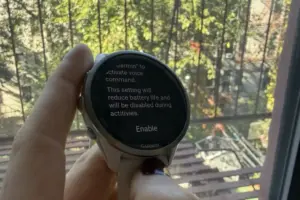
The correlation was quickly identified by the community. Users discovered that by disabling the "OK Garmin" wake word, the battery drain effectively ceased, and the device’s estimated runtime returned to its pre-update baseline. This diagnostic breakthrough confirmed that the culprit was the microphone’s persistent "listening" mode, which keeps the processor active to detect the specific trigger phrase.
Supporting Context & Metrics: The Mechanics of the Drain
To understand why the "OK Garmin" feature is causing such a dramatic drop in performance, one must look at the hardware limitations of modern smartwatches.
The Always-Listening Penalty
In a typical smartwatch, the device spends the vast majority of its time in a low-power state. When a user lifts their wrist or presses a physical button, the processor ramps up to handle the request. By implementing "OK Garmin," the watch is forced to maintain a constant, low-level power draw to keep the microphone active and the speech-recognition module ready to parse the wake word.

Even in a power-optimized state, this constant vigilance creates a "battery tax." While Garmin has not released granular data on the specific milliamp-hour (mAh) consumption of this feature, the community-reported data is staggering:
- Reported Drain: 35% to 50% decrease in total device runtime.
- Affected Models: Fenix 8, Forerunner 570, Forerunner 970, and Venu 4.
- Impact: Users who rely on multi-day battery life for long-distance training or backcountry expeditions are finding their devices dead mid-week, a significant departure from the brand’s "set it and forget it" reputation.
The Tradeoff Problem
The fundamental issue is that Garmin’s user base is composed largely of endurance athletes. For a runner training for an ultramarathon or a hiker on a multi-day trek, battery life is not just a luxury—it is a critical safety feature. The convenience of saying "OK Garmin, start a run" is, for many, objectively less valuable than having a watch that remains powered for the duration of a 50-mile race.
Official Statements and Garmin’s Stance
Garmin has acknowledged the issue, noting in its documentation that enabling voice features will inherently reduce battery performance. However, the company has been careful to frame this as an expected consequence of hardware-software interaction rather than a "bug" in the code.
In a recent communication, a Garmin spokesperson noted:
"We continuously update our devices to provide the best features for our users. Voice-activated features require constant input monitoring, which by design consumes more energy. We encourage users to manage their device settings based on their specific battery life requirements."
While the company has not ruled out future firmware optimizations that might mitigate this drain, the current guidance remains: if you prioritize battery life over voice control, the feature should be disabled. Garmin remains committed to the versatility of its ecosystem, but it is clear that they are balancing the demands of "tech-savvy" casual users against the rigorous requirements of their core performance-oriented demographic.
Practical Troubleshooting: How to Reclaim Your Battery
If you have noticed a decline in your Garmin device’s performance following the September update, you can rectify it immediately by adjusting your system settings. The process is straightforward:
- Navigate to the Menu: Press and hold the "Up" button on your watch to access the Settings menu.
- Access System Preferences: Scroll down to the System option and select it.
- Locate Voice Settings: Within the System menu, tap on Voice.
- Disable the Wake Word: Toggle the "OK Garmin" switch to the Off position.
- Refine Assistant Settings: If you continue to see battery depletion, you may also disable the "Phone Assistant" wake word within the same menu.
It is important to note that disabling these features does not remove voice control entirely. Users can still initiate voice commands by using the watch’s physical buttons to trigger the interface manually. This hybrid approach allows users to utilize the technology on their own terms, ensuring that the watch remains an asset rather than a liability during long-distance efforts.

Future Outlook: The Evolution of Wearable Efficiency
The current situation with the "OK Garmin" feature serves as a case study in the broader evolution of wearable tech. As smartwatches incorporate more features—AI integration, real-time health monitoring, and voice assistants—the pressure on battery technology has never been higher.
Looking Toward "Always-On" Optimization
In the future, we can expect to see advancements in low-power digital signal processing (DSP). If Garmin intends to keep voice features as a core pillar of their user experience, the next generation of hardware will likely require dedicated, ultra-low-power cores specifically designed to handle voice detection without waking the primary processor. Until such hardware becomes standard, we are in a transition period where software-based, "always-on" features will continue to clash with the physical realities of current lithium-ion battery capacity.
The Role of User Feedback
The speed at which the Garmin community identified and isolated this issue is a testament to the transparency and technical literacy of the brand’s user base. By actively participating in forums and sharing their own findings, users are not only finding solutions for themselves but are providing the company with the data necessary to refine future software iterations.
For now, the lesson for the consumer is clear: while the promise of new, high-tech features is enticing, the "real-world" cost of these features must be carefully weighed against your actual usage patterns. If you are an athlete who needs every ounce of power, it is wise to approach "convenience" updates with caution.
Garmin has successfully pushed the boundaries of what a watch can do, but as we’ve seen this month, the most valuable feature a performance watch can offer remains the same as it has always been: the ability to keep going.
Meredith Dietz is a Senior Staff Writer at Lifehacker. A marathon runner and stand-up comedian, she specializes in the intersection of personal fitness technology, home gym equipment, and the realities of training for the long haul.