Executive Overview
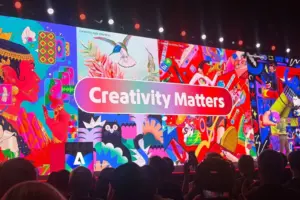
The annual Adobe MAX conference has long served as the premier stage for the technology giant to pull back the curtain on its most ambitious research initiatives. Known colloquially as "Sneaks," this showcase gives the global design community an exclusive, early look at experimental prototypes that often transition from theoretical concepts into industry-standard software tools. Among the standout announcements at Adobe MAX, one experimental project is poised to fundamentally transform the daily workflows of illustrators, graphic designers, and concept artists alike: Project Link Up.
Project Link Up introduces an intuitive yet technologically profound paradigm shift for vector design. By turning the basic, everyday gesture of dragging and dropping an object into a context-aware fusion engine, the tool automatically matches a scene’s perspective, scale, lighting, and overarching style. For digital artists, the implications are vast: the tedious, repetitive chore of manually redrawing objects at new viewing angles or painstakingly readjusting perspective grids could soon be relegated to the past.
To uncover the mechanics, philosophy, and future trajectory of this groundbreaking tool, this report explores exclusive insights from Hailin Jin, Senior Principal Scientist and Research Lead for Imaging and Design at Adobe. Furthermore, we examine how Project Link Up fits into the broader evolution of AI-assisted creativity, alongside concurrent announcements such as the preview of Photoshop capabilities, cementing a transformative era for digital creators worldwide.
Detailed Chronology: From Everyday Gestures to Context-Aware AI
The genesis of Project Link Up did not stem from an abstract algorithmic breakthrough; rather, it began with a close observation of human behavior and a deeply rooted designer frustration.
The "Aha!" Moment: Rethinking the Drag-and-Drop Gesture
Traditionally, vector and raster design software treat the act of dragging an object as a purely mechanical instruction regarding spatial placement—moving coordinates from point A to point B. However, Mohit and the Adobe research team recognized that human intent behind a drag gesture is far more complex and layered.
Consider a standard design scenario: an illustrator is placing a vector-drawn car into a parking space within a complex city street illustration. Historically, this simple action requires a multi-step, manual process:
- Dragging the asset onto the artboard.
- Manually calculating or eyeballing the perspective transformation.
- Scaling the asset to fit the compositional depth of the background scene.
- Adjusting the lighting, shadows, and color palette to harmonize the asset with its new environment.
The Adobe team asked a fundamental question: Could the drag gesture itself communicate a deeper creative direction? Could the software intercept the physical act of placement and autonomously adapt the object to its new surroundings while ensuring the final output remains fully editable? This inquiry became the driving force behind Project Link Up.
Prototyping Context-Aware Fusion
During the development phase, the research team focused on bridging the gap between raw user input and intelligent environmental analysis. When a user drags a vector graphic across an artboard, Project Link Up analyzes the underlying scene’s geometry, perspective lines, and lighting scheme in real-time.
Rather than stamping a static, flattened image onto the canvas, the tool executes a context-aware fusion. It dynamically recalculates the vector paths of the dragged object, warping and reforming them to match the vanishing points and depth of the target composition. Crucially, the engineering team prioritized vector integrity—ensuring that the transformed object does not degrade into a rasterized bitmap, but remains a collection of modifiable vector paths, anchor points, and strokes.
Official Statements and Behind-the-Scenes Insights
To gain a deeper understanding of the engineering and creative philosophy driving Project Link Up, we spoke directly with Hailin Jin, Senior Principal Scientist and Research Lead for Imaging and Design at Adobe.
Bridging Intent and Control: The "Creativity Slider"
One of the primary concerns for professional designers when interacting with AI-driven or automated tools is the potential loss of control. Creatives do not want software to simply guess and finalize an image; they require granular dials to steer the creative output.
When asked whether designers will have parametric control over the intensity of visual adaptations, Jin confirmed that Adobe’s current prototype incorporates a dedicated "creativity slider."
"In our current prototype, a creativity slider lets the designer guide how subtle or expressive the adaptation should be, from preserving more of the original form to exploring a more dramatic transformation," Jin explained.
This slider acts as a bridge between automation and artistic intent. If a designer wants a subtle perspective shift that strictly honors the original asset’s aesthetic, they can dial back the parameter. Conversely, if they want the tool to explore a more dramatic, stylized transformation that leans heavily into the target scene’s artistic quirks, they can ramp it up. The ultimate goal is to combine the speed and ease of a physical gesture with explicit creative control, ensuring the resulting vector artwork remains fully editable for downstream refinement.
Harmonizing Conflicting Artistic Styles
Vector design frequently involves blending disparate visual elements—such as dropping a retro, minimalist icon into a hyper-detailed, complex digital painting. How does Project Link Up handle two vector elements that are fundamentally opposed in style?
Jin emphasized that contrasting styles do not necessarily need to be forcibly homogenized. The core intelligence of the tool lies in deciphering the creator’s intent:
- Should the incoming object seamlessly match the surrounding scene?
- Should it aggressively retain its own distinct personality?
- Or is the designer aiming to create a deliberate, eye-catching contrast?
"Project Link Up explores combining the drag gesture and scene context with creative controls and prompt guidance," Jin noted. A designer can explicitly specify parameters such as "match the scene’s illustration style" or "keep this character’s style, but adapt its perspective and lighting." By allowing creators to steer the relationship between elements through natural language prompts or direct manipulation controls, the software acts as an intelligent collaborator rather than an autonomous dictator.
Eliminating the Most Tedious Creative Chores
When asked to pinpoint the single most time-consuming, tedious chore Project Link Up could remove from a designer’s daily routine, Jin pointed directly to the mechanical burden of perspective correction and asset reworking.
"A strong example is manually reworking an asset to fit a new scene, particularly redrawing it from a different perspective," Jin stated. "The team is exploring how that adaptation could happen as the designer places the object. That could reduce the preparation needed to evaluate a composition and give designers more time to refine the creative decisions that make it work."
By automating the geometry and perspective alignment during the initial placement phase, designers are spared hours of manual drafting, vector distortion, and path adjustment. This frees up precious cognitive bandwidth, allowing professionals to focus on higher-level storytelling, color harmony, and conceptual ideation.
Supporting Context, Metrics, and Ecosystem Integration
Project Link Up does not exist in a vacuum; it is part of a broader, company-wide strategic push by Adobe to infuse its entire software ecosystem—spanning Illustrator, Photoshop, Fresco, and Adobe Express—with deep contextual intelligence.
The Philosophy of Immediate Creative Exploration
The overarching design philosophy behind Project Link Up centers on accelerating the cycle of creative discovery. In traditional workflows, testing a compositional hypothesis often requires a high barrier of execution effort. If a designer wants to see how a complex asset looks from a different angle in a new scene, they may have to spend 20 or 30 minutes redrawing it before they can even evaluate whether the artistic idea holds merit.
When the friction of execution outweighs the speed of thought, creative exploration stifles. Project Link Up aims to lower this barrier. By allowing designers to test different relationships between objects instantly via a simple drag gesture, the tool encourages uninhibited experimentation. If a combination proves promising, the fact that the output remains an editable vector file ensures the designer can seamlessly carry the idea forward to completion.
The Broader Adobe MAX 2026 Landscape
Project Link Up was just one of several groundbreaking "Sneaks" unveiled at Adobe MAX 2026. Alongside advancements in vector manipulation, Adobe also showcased major updates across its raster and imaging suites, most notably previewing next-generation capabilities for Photoshop. These updates highlight a unifying theme across Adobe’s research division: moving away from dumb tools that only respond to pixel coordinates, and moving toward intelligent applications that genuinely "understand" the content they house.
Future Outlook: The Next Five Years of Creative Software
Looking ahead over the next five years, the implications of tools like Project Link Up extend far beyond incremental software updates. They point toward a fundamental evolution in what it feels like to work inside professional creative applications.
Moving Toward Context-Aware Applications
According to Hailin Jin, a major direction in Adobe’s ongoing research is enabling software tools to comprehend creative content and the complex semantic relationships within it.
"That understanding can make interactions more meaningful: moving an object into a scene could communicate an intention about perspective or composition, rather than simply a new position," Jin projected.
As artificial intelligence and machine learning models become more deeply integrated into the structural core of applications like Adobe Illustrator, the software will increasingly transition from a passive canvas into an active, responsive partner. For experienced designers, this evolution does not threaten their autonomy; rather, it amplifies it. It provides a mechanism to express professional judgment more directly, eliminating repetitive mechanical friction while retaining absolute, precise control over the final artistic output.
What Creators Can Expect Next
As Project Link Up transitions from an experimental MAX Sneak into rigorous product testing and eventual integration into Adobe’s Creative Cloud roadmap, it serves as a beacon for the future of digital art. By respecting the sanctity of vector artwork while harnessing the power of spatial and contextual AI, Adobe is paving the way for a more fluid, intuitive, and inspiring creative landscape.
For digital artists, illustrators, and designers tuning into Adobe MAX, the message is clear: the future of design is not about letting algorithms do all the work, but about building tools smart enough to understand what you want to achieve the exact moment your hand moves.