Executive Overview
In the rapidly evolving landscape of smartphone videography, capturing dynamic, multi-subject scenes has traditionally required a compromise. Videographers have historically had to choose between framing a wide shot to encompass an entire group or meticulously panning and tracking a single individual, often missing crucial moments in the periphery. Samsung has fundamentally disrupted this paradigm with the introduction of My FanCam, a post-production video-tracking tool powered by Galaxy AI.
Debuting alongside the company’s flagship foldable ecosystem—specifically the Galaxy Z Fold8 and Galaxy Z Fold8 Ultra running One UI 9—My FanCam shifts the burden of composition from the live-recording environment to the editing suite. Rather than locking down a tracking shot in real-time, users can record a broad, uninterrupted scene of multiple moving subjects and later isolate, center, and track any specific person. Galaxy AI dynamically reframes the archival footage, generating a tight, professional-grade tracking shot tailored to a chosen aspect ratio.
This technological leap represents a paradigm shift in how consumers and content creators approach home videos, athletic events, and group performances. By decoupling the act of filming from the decision of framing, Samsung has effectively democratized advanced cinematic tracking techniques, eliminating the shaky cam and missed opportunities that plague spontaneous group recordings.
Detailed Chronology
The genesis of My FanCam follows Samsung’s multi-year trajectory of integrating advanced machine learning directly into consumer mobile hardware and software. To understand how this feature arrived in the hands of everyday users, it is vital to trace the technological milestones that paved the way for post-production generative framing.
The Foundation: Auto Framing and Real-Time AI
Years prior to the launch of My FanCam, Samsung experimented with live-action composition tools like Auto Framing. Designed primarily for video calls, vlogs, and stationary tripod setups, Auto Framing utilized neural processing units (NPUs) to detect faces and bodies within a field of view, digitally zooming and panning the sensor in real-time to keep the speaker centered.
While effective for controlled environments, Auto Framing possessed inherent limitations. Because it operated during the recording process, it forced the camera software to make permanent predictive decisions. If two subjects crossed paths rapidly, or if the action moved unpredictably—such as on a soccer field or during a high-energy dance routine—the real-time algorithm could stutter, lose its subject, or restrict the user from ever seeing the broader context of what happened outside the live crop.
The Software Leap: One UI 9 and the Generative Turn
The true catalyst for My FanCam arrived with the conceptualization and deployment of One UI 9. As Samsung’s mobile AI ambitions matured under the Galaxy AI umbrella, engineers shifted focus from live computer vision intervention to asynchronous video manipulation.
During the development cycle of the Galaxy Z Fold8 lineup, Samsung’s software division recognized that modern smartphone sensors—capable of capturing ultra-high-resolution video at 4K and 8K—contained far more visual data than what was displayed in a final rendered file. By leveraging the immense processing power of the latest mobile chipsets, Samsung devised an analytical framework capable of parsing an entire recorded video file, mapping the trajectories of every individual present, and allowing the user to retroactively apply a virtual camera operator to the file.
Galaxy Unpacked and the Public Debut
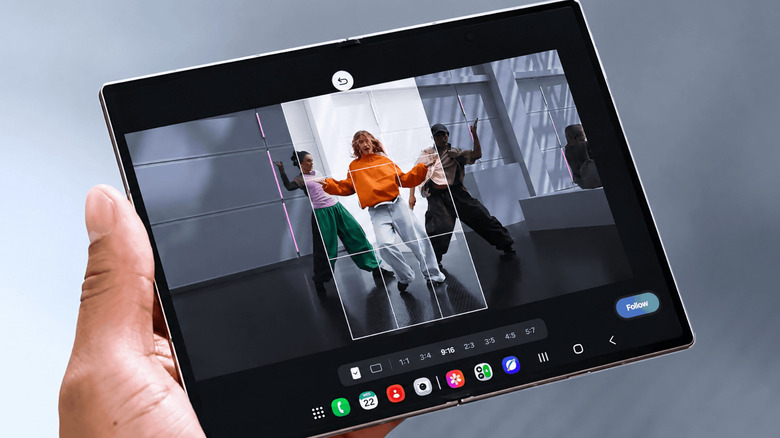
My FanCam made its official global debut at the Galaxy Unpacked event in July 2026. Unveiled as a marquee feature of the Galaxy Z Fold8 and Z Fold8 Ultra, it immediately captured the attention of tech journalists and content creators alike. Demonstrations at the event highlighted the tool’s ability to take a sprawling, wide-angle dance recital video and instantly output vertical, platform-ready clips tracking individual performers with buttery-smooth digital panning.
Supporting Context & Metrics: How My FanCam Works in Practice
To fully appreciate the utility of My FanCam, one must examine its mechanical workflow within the Samsung Gallery ecosystem. The feature is engineered to require zero pre-configuration, freeing the user from the anxiety of missing a shot while fumbling with camera settings.
Step-by-Step Workflow in Samsung Gallery
- Capture Without Constraints: The user records a video of a dynamic group scene—such as a soccer match, a school play, or a family gathering—using a wide field of view.
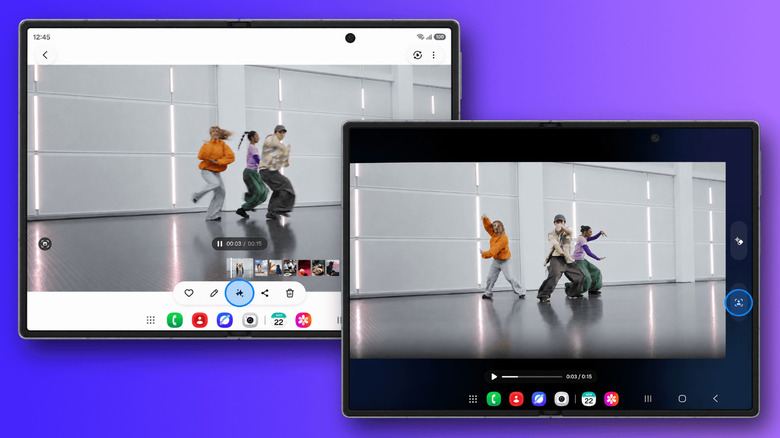
- Accessing the Tool: The user opens the Samsung Gallery application, navigates to the desired video clip, and accesses the integrated editing suite.
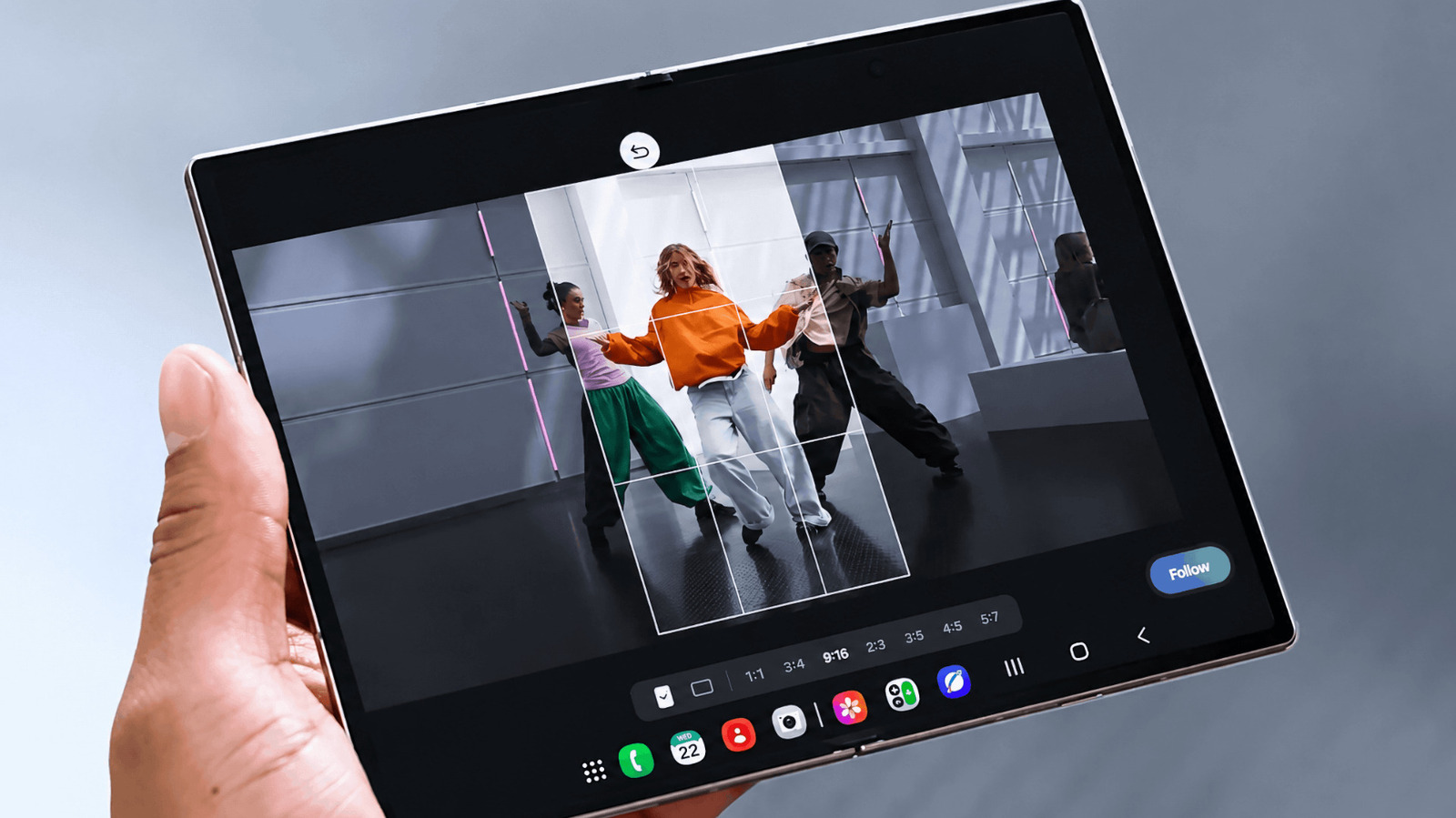
- Activating Galaxy AI: Tapping the designated Galaxy AI icon reveals a menu of advanced editing suites, from which the user selects My FanCam.
- Subject Identification: Galaxy AI scans the video file, performing rapid facial and body recognition to isolate every individual appearing within the frame.
- Target Selection: The user taps on the specific person they wish to make the "main character" of the new video.
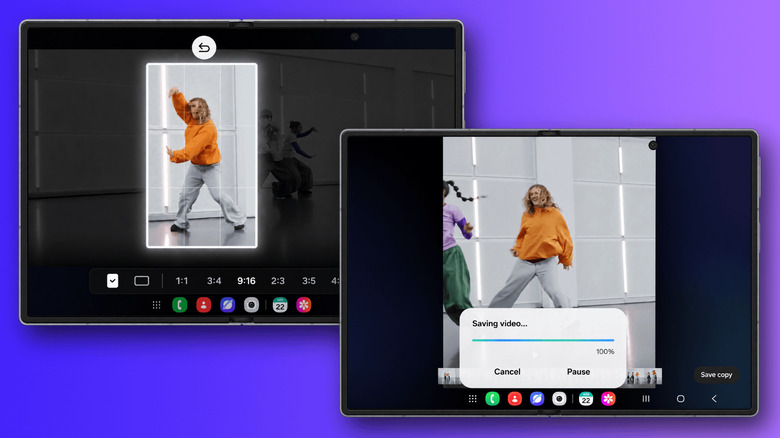
- Aspect Ratio Customization: The user selects the target aspect ratio (e.g., vertical 9:16 for TikTok, Instagram Reels, and YouTube Shorts, or horizontal 16:9 for traditional viewing).
- Rendering and Export: Upon tapping Follow, Galaxy AI generates a newly cropped, digitally stabilized tracking shot that continuously centers the chosen subject, even as they move dynamically across the original canvas.
The Physics of Post-Production Cropping
At its core, My FanCam functions by dynamically moving a smaller resolution window within a larger, higher-resolution master recording. Consequently, the success of the feature relies heavily on the capture strategy employed by the user:
- The Wide-Frame Rule: Because My FanCam relies on cropping into existing footage, shooting with a wider frame is strongly encouraged. If a videographer films too tightly from the start, Galaxy AI is starved of peripheral pixel data. When the target subject moves toward the edge of the frame, the AI lacks the surrounding image area required to reposition the crop smoothly.
- Resolution Retention: Modern Samsung foldables capture video at resolutions high enough to withstand significant digital cropping without catastrophic degradation in perceived sharpness, making post-production reframing viable for social media distribution.
- Limitations and Edge Cases: Samsung is transparent about the boundaries of its AI. My FanCam cannot recover information that was never captured by the sensor. If a subject moves completely outside the boundaries of the original recording, or if visual obstructions permanently obscure them, tracking may fail or terminate. Furthermore, the feature relies entirely on successful subject detection; highly chaotic or dimly lit environments can occasionally reduce tracking accuracy.
Official Statements and Industry Insights
Samsung executives and software engineers have framed My FanCam not merely as a novelty, but as a fundamental evolution in personal videography, designed to alleviate cognitive load during high-stress recording scenarios.
"We’ve all experienced the frustration of trying to film a child’s sports game, a graduation, or an impromptu dance performance," noted a Samsung product lead during the One UI 9 briefing. "You find yourself trapped behind the screen, frantically panning back and forth, trying to guess where the action is going next. With My FanCam and Galaxy AI, we are returning the joy of living in the moment. Film the whole scene broadly, put down your worries, and let your phone become your personal post-production director afterward."
Industry analysts have similarly praised the strategic shift toward asynchronous AI manipulation. In an era where short-form video platforms demand rapid, highly focused vertical content, tools that bridge the gap between casual group recordings and polished, character-driven narratives possess immense consumer appeal.
However, tech analysts also emphasize the hardware dependency of such features. By tying My FanCam to the processing architecture found in the One UI 9 rollout, Samsung underscores the heavy computational demands placed on on-device NPUs. Processing thousands of frames of high-resolution video to track non-linear human motion requires dedicated silicon, explaining why the feature cannot simply be back-ported to older generations of hardware without performance compromises.
Future Outlook: The Trajectory of Generative Video Tools
The introduction of My FanCam is a bellwether for the future of mobile photography and videography. As on-device artificial intelligence continues to advance at an exponential rate, the line separating professional post-production suites from consumer smartphone galleries is rapidly dissolving.
Expanding Ecosystem Integration
While My FanCam currently launches alongside the elite Galaxy Z Fold8, Z Fold8 Ultra, and select One UI 9-compatible devices, industry watchers anticipate a wider trickle-down effect. As Samsung refines its algorithms and optimizes neural processing efficiencies, iterative updates will likely bring similar post-production tracking capabilities to broader device tiers, including the Galaxy S-series flagships.
However, users must remain mindful of Samsung’s regional and hardware-specific caveats. Because advanced AI features frequently rely on localized processing capabilities, cloud-assisted enhancements, and regional software compliance, feature parity across all One UI 9 devices is not guaranteed.
The Next Frontier: Multi-Subject Branching and Generative In-Painting
Looking further ahead, tools like My FanCam will likely evolve beyond simple single-subject tracking. Future iterations of mobile generative AI could introduce:
- Multi-Subject Switching: Allowing creators to tap dynamically between different people within the same timeline, automatically generating a multi-cam-style edit from a single wide-angle recording.
- Generative In-Painting for Cropped Edges: Utilizing generative fill technologies to reconstruct backgrounds when a crop moves near the absolute edge of a master recording, effectively eliminating the spatial limitations of initial framing.
- Audio-Assisted Tracking: Combining visual facial recognition with directional audio analysis to automatically prioritize tracking subjects who are speaking or laughing audibly within a crowd.
Conclusion
Samsung’s My FanCam successfully reframes the philosophy of mobile video capture. By liberating users from the tyranny of real-time tracking, it transforms every casual group video into a treasure trove of potential cinematic moments. As Galaxy AI continues to mature, features like My FanCam ensure that the smartphone camera is no longer just a passive recording device, but an active, intelligent collaborator in the creative process.