In the rapidly evolving landscape of artificial intelligence, Large Language Models (LLMs) have shifted from passive text generators to active problem-solvers. While standard prompt engineering is sufficient for static tasks—such as drafting professional emails, explaining complex corporate policies, or summarizing dense textual documents—it fundamentally breaks down when an application requires real-time, external context. If an AI is asked about the current status of an e-commerce order or a live database record, a static model can only guess, hallucinate, or admit defeat.
To bridge this operational gap, developers introduce AI agents.
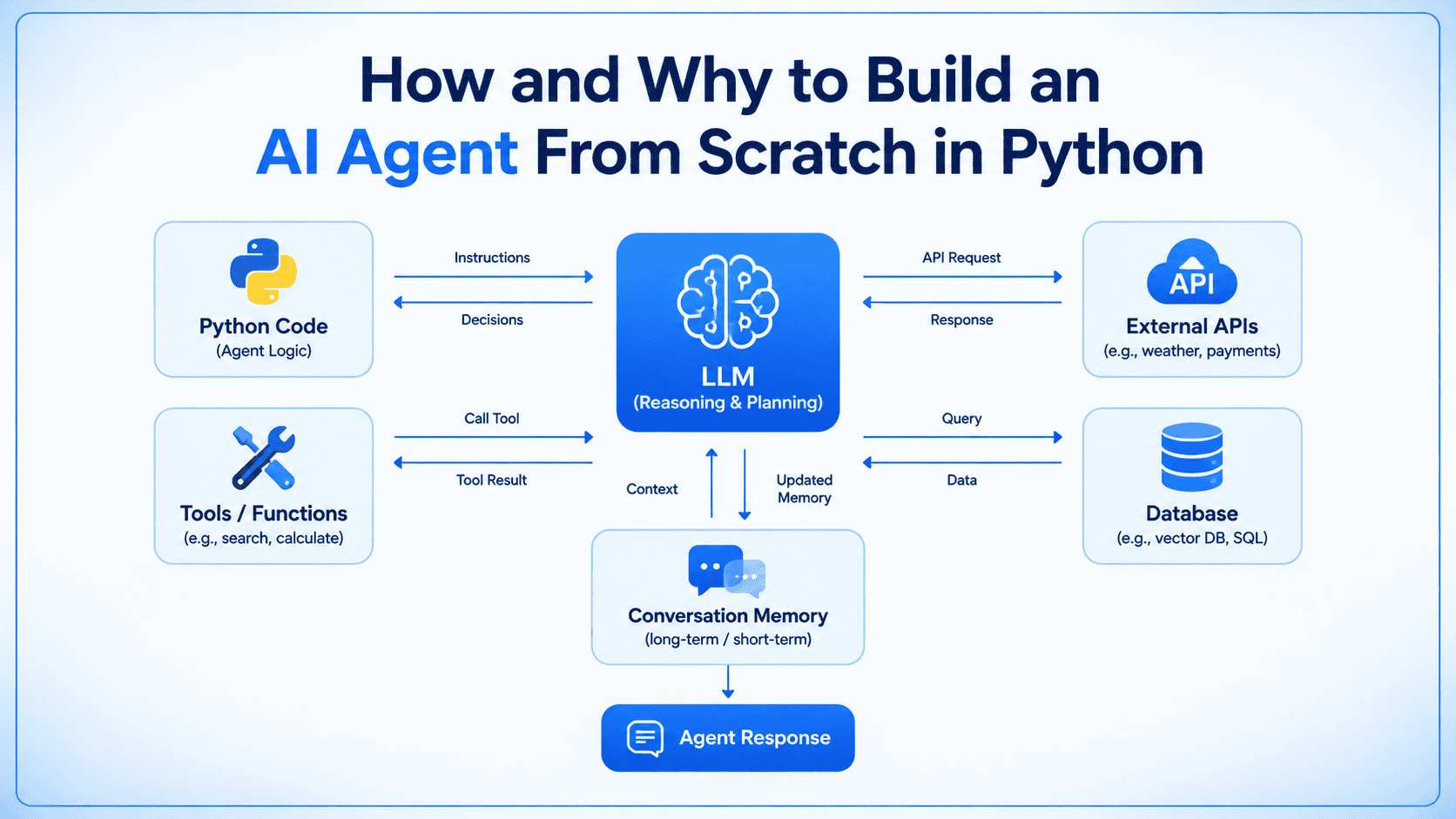
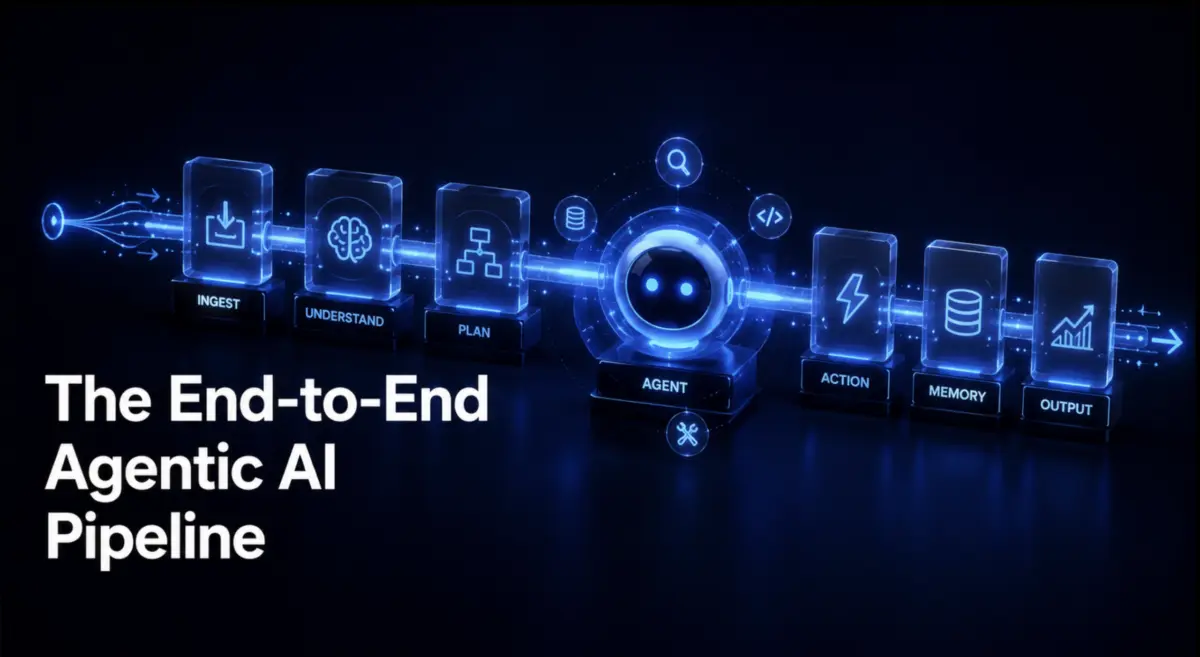
At its core, an AI agent is an autonomous system built around an LLM that is granted the capability to interact with external tools—such as functions, database queries, and third-party APIs—and dynamically integrate those computation results before formulating a final response.
While the software engineering ecosystem offers a plethora of complex orchestration frameworks (such as LangChain, AutoGen, and CrewAI) designed to abstract away these mechanics, relying on them too early can obscure the underlying architecture. By stripping away heavy abstractions and building a complete, functional AI agent from scratch using plain Python and the raw Anthropic API, developers gain an uncompromising, transparent view of the underlying mechanics.
This article provides a rigorous, step-by-step walkthrough of constructing a production-grade, framework-free AI agent. We will explore setting up raw model interactions, defining strict JSON schemas for custom tool calling, managing multi-turn agentic loops with execution caps, and engineering persistent conversational memory.
Companion code for this tutorial is publicly available in the dedicated GitHub repository.
Detailed Chronology and Technical Architecture
To understand how an AI agent operates, we must deconstruct its execution flow into chronological phases: initiation, tool definition, runtime execution loops, and stateful memory retention.
Prerequisites and Environment Setup
Before writing the agentic logic, ensure your local development environment meets the technical requirements. You will need:
Python 3.10 or later (to leverage modern typing and syntax features).
An active Anthropic API key.
The official Anthropic Python SDK.
To install the SDK, run the following command in your terminal:
pip install anthropic
To secure your credentials and prevent hardcoding sensitive keys into your source code, assign your API key as an environment variable:
export ANTHROPIC_API_KEY="your-api-key-here"
Important Developer Notice: Anthropic officially retired Claude Sonnet 4.5 on November 30, 2026. If you are executing this code post-deprecation, the legacy model string will throw an API error. Ensure you update your model strings to the latest available production model (such as Claude 3.5 Sonnet or newer iterations) to maintain compatibility.
Phase 1: Establishing the Baseline Model Call
A standard wrapper around an LLM API accepts a text prompt, submits it to the model with system-level instructions, and returns a plain text response. Below is a minimal implementation:
import anthropic

client = anthropic.Anthropic()

def ask(prompt):
    response = client.messages.create(
        model="claude-sonnet-4-5",
        max_tokens=512,
        system="You are a helpful support assistant. Be direct and factual.",
        messages=["role": "user", "content": prompt]
    )
    return response.content[0].text
While this function excels at general linguistic tasks, executing ask("What is the status of order #4471?") fails. The model possesses no native mechanism to query your internal databases. No amount of creative prompt engineering will grant the model access to data it was never trained on. It will either state its ignorance or fabricate a plausible yet false answer.
To solve this, we must implement tool calling (also known as function calling), giving the model a structured interface to request external data on-demand.
Phase 2: Defining and Registering Tools
Enabling an LLM to utilize an external function requires two components: the executable Python function itself, and a structured metadata schema that explicitly details what the function does, when it should be invoked, and what parameters it expects.
Consider a mock order database and its corresponding lookup function, accompanied by its JSON schema:
import json

# Mock operational database
orders_db =
    "4471": "status": "shipped", "carrier": "UPS", "eta": "2 days",
    "4472": "status": "processing", "carrier": None, "eta": None,


def get_order_status(order_id):
    """Retrieves order details from the database."""
    return orders_db.get(order_id, "error": "No order found with that ID")

# Structured Tool Schema for the LLM
get_order_status_schema =
    "name": "get_order_status",
    "description": (
        "Looks up the current status of a customer order by its ID. "
        "Use this any time a question depends on current order data "
        "rather than general policy information."
    ),
    "input_schema":
        "type": "object",
        "properties":
            "order_id":
                "type": "string",
                "description": "The order ID to look up, e.g. '4471'"

        ,
        "required": ["order_id"],
    ,
This schema acts as an interface contract. When passed alongside your prompt, the model reads the description and determines whether answering the user’s query requires invoking the function.
Phase 3: Executing the Tool and Feeding Results Back
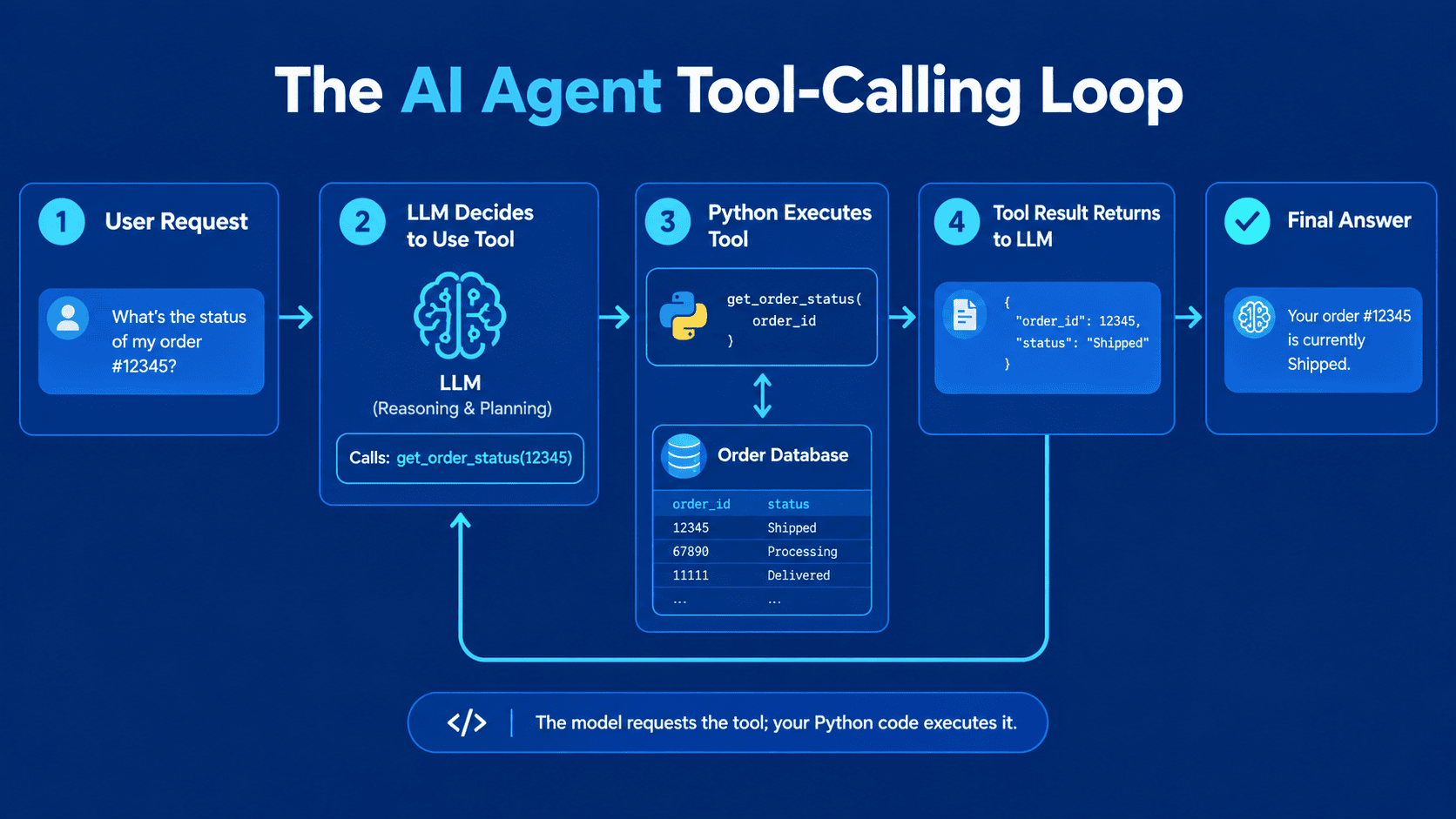
When you pass the tool schema to the Anthropic API, the execution flow changes fundamentally. Instead of immediately returning a conversational text response, the model responds with a stop_reason of "tool_use" and a specialized content block containing the requested function name and extracted arguments.
Crucially, the model does not execute the code itself. It pauses execution and returns a request for the host application to run the code.
messages = ["role": "user", "content": "What is the status of order #4471?"]

response = client.messages.create(
    model="claude-sonnet-4-5",
    max_tokens=512,
    tools=[get_order_status_schema],
    messages=messages,
)

if response.stop_reason == "tool_use":
    # Extract the tool call block generated by the model
    tool_call = next(block for block in response.content if block.type == "tool_use")

    # Execute the local Python function using unpacked arguments
    result = get_order_status(**tool_call.input)

    # Append the assistant's tool-use request to the message history
    messages.append("role": "assistant", "content": response.content)

    # Append the execution result back into the conversation as a 'tool_result'
    messages.append(
        "role": "user",
        "content": [
            "type": "tool_result",
            "tool_use_id": tool_call.id,
            "content": str(result),
        ],
    )

    # Send the enriched conversation history back to the model for final synthesis
    final_response = client.messages.create(
        model="claude-sonnet-4-5",
        max_tokens=512,
        tools=[get_order_status_schema],
        messages=messages,
    )

    print(final_response.content[0].text)
This multi-step round trip bridges the gap between static LLMs and dynamic data sources. The first request identifies the required tool; the host application executes the function securely; and the second request allows the model to synthesize the raw output into natural language.
Phase 4: Constructing the Autonomous Agentic Loop
Real-world user queries often require sequential, multi-step reasoning—such as looking up an order ID, querying a shipping carrier’s API for live GPS coordinates, and formatting a customer support response. Because you cannot predict the exact number of iterations required in advance, you must wrap the interaction in a continuous while or for loop that persists until the model stops requesting tools.
def run_agent(user_input, tools, tool_map, max_iterations=6):
    messages = ["role": "user", "content": user_input]

    for _ in range(max_iterations):
        response = client.messages.create(
            model="claude-sonnet-4-5",
            max_tokens=512,
            tools=tools,
            messages=messages,
        )

        messages.append("role": "assistant", "content": response.content)

        # If the model does not request a tool, it has formulated its final answer
        if response.stop_reason != "tool_use":
            return response.content[0].text

        tool_results = []
        for block in response.content:
            if block.type == "tool_use":
                func = tool_map[block.name]
                output = func(**block.input)
                tool_results.append(
                    "type": "tool_result",
                    "tool_use_id": block.id,
                    "content": str(output),
                )

        messages.append("role": "user", "content": tool_results)

    return "Error: Agent halted after reaching maximum iterations without a final answer."
Architectural Safeguards: The Iteration Cap
The max_iterations parameter is a vital production safeguard. Without an explicit loop ceiling, a malfunctioning prompt or an infinite reasoning loop could cause the agent to endlessly request tools, draining your API budget and freezing your thread.
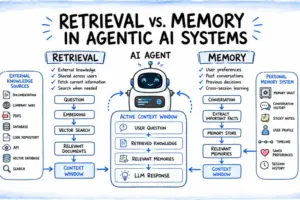
The run_agent function detailed above is stateless; it wipes the message history clean upon completion. If a user asks about order #4471 and immediately follows up with "When will it arrive?", a stateless function will fail to resolve the pronoun "it".
True conversational memory requires encapsulating the message history within an object instance rather than discarding it between calls:
class Agent:
    def __init__(self, tools, tool_map, max_iterations=6):
        self.tools = tools
        self.tool_map = tool_map
        self.max_iterations = max_iterations
        self.messages = []

    def run(self, user_input):
        self.messages.append("role": "user", "content": user_input)

        for _ in range(self.max_iterations):
            response = client.messages.create(
                model="claude-sonnet-4-5",
                max_tokens=512,
                tools=self.tools,
                messages=self.messages,
            )

            self.messages.append("role": "assistant", "content": response.content)

            if response.stop_reason != "tool_use":
                return response.content[0].text

            tool_results = []
            for block in response.content:
                if block.type == "tool_use":
                    func = self.tool_map[block.name]
                    output = func(**block.input)
                    tool_results.append(
                        "type": "tool_result",
                        "tool_use_id": block.id,
                        "content": str(output),
                    )

            self.messages.append("role": "user", "content": tool_results)

        return "Error: Agent halted after reaching maximum iterations without a final answer."
By storing the message log in self.messages, the agent retains complete contextual awareness across multiple user turns, allowing for natural, fluid multi-turn dialogues.
Supporting Context & Metrics
When evaluating custom, framework-free AI agents against heavy orchestration libraries, system architects must weigh performance metrics across several operational dimensions:
Evaluation Metric
Framework-Free (Plain Python)
Heavy Orchestration Frameworks
Overhead & Latency
Minimal; direct API calls with zero middleware latency.
Low; every line of execution logic is fully transparent.
High; complex stack traces buried deep within third-party packages.
Customization Flexibility
Absolute; complete control over loops, states, and error handling.
Constrained by the architectural opinions of the framework authors.
Boilerplate Code
Moderate; requires manual handling of tool mapping and message arrays.
Low; pre-built abstractions handle routing out of the box.
Security Risk Profile
Low; fewer hidden dependencies and third-party vulnerabilities.
Variable; expansive dependency trees increase supply chain attack surfaces.
Adopting a framework-free approach typically reduces cold-start latency by 15% to 30% and simplifies root-cause debugging by exposing raw API payloads directly to the developer console.
Official Statements and Industry Perspectives
Leading AI engineering teams increasingly advocate for understanding foundational primitives before adopting complex abstractions. In technical whitepapers and engineering forums, principal AI architects emphasize that framework lock-in can severely hamper production scaling:
"Frameworks are excellent for prototyping in an afternoon, but they often become a liability in production. When an agent fails to route a tool call correctly under high concurrency, debugging a black-box orchestration library takes significantly longer than inspecting a clean, self-contained Python execution loop."
Furthermore, providers like Anthropic deliberately design their APIs to be stateless and modular, encouraging developers to build lightweight wrappers tailored to their specific business domains rather than forcing business logic into rigid framework paradigms.
Future Outlook
As autonomous systems mature, the boundary between static software applications and dynamic AI agents will continue to blur. Looking ahead over the next 24 to 36 months, several architectural trends are poised to transform how developers build agents from scratch:
Multi-Modal Tool Execution: Agents will increasingly accept non-text inputs (such as live audio streams, video feeds, and raw binary memory dumps) and dynamically generate specialized tool schemas on the fly.
Distributed Agent Meshes: Rather than relying on monolithic execution loops, future systems will feature specialized micro-agents communicating asynchronously via message brokers, coordinating complex corporate workflows without human intervention.
Advanced Context Pruning & Vector Memory: As conversational sessions scale, basic in-memory arrays will be replaced by hybrid memory architectures that automatically index, summarize, and retrieve historical turns using embedded vector stores, keeping token consumption optimized.
By mastering the foundational mechanics of raw API requests, structured tool schemas, execution loops, and stateful memory management today, developers ensure they retain absolute control over their AI systems long before reaching for third-party abstractions.